

- Berichten: 3
- Ontvangen bedankjes 1
Report any technical problems you discover and discuss solutions.
Invisible glossary terms in High contrast theme
- AnneVI
-
 Onderwerp Auteur
- Offline
- Nieuw lid
-

Minder
Meer
2 jaren 1 maand geleden #9194
door AnneVI
Invisible glossary terms in High contrast theme werd gestart door AnneVI
Dear Xerte Community,
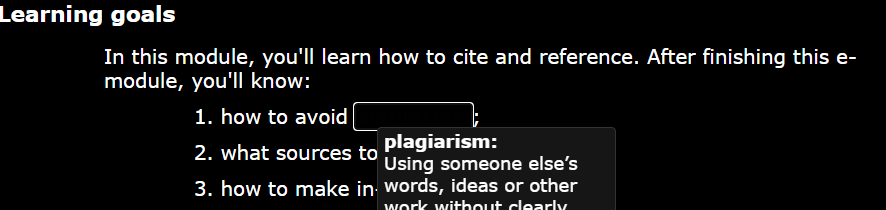
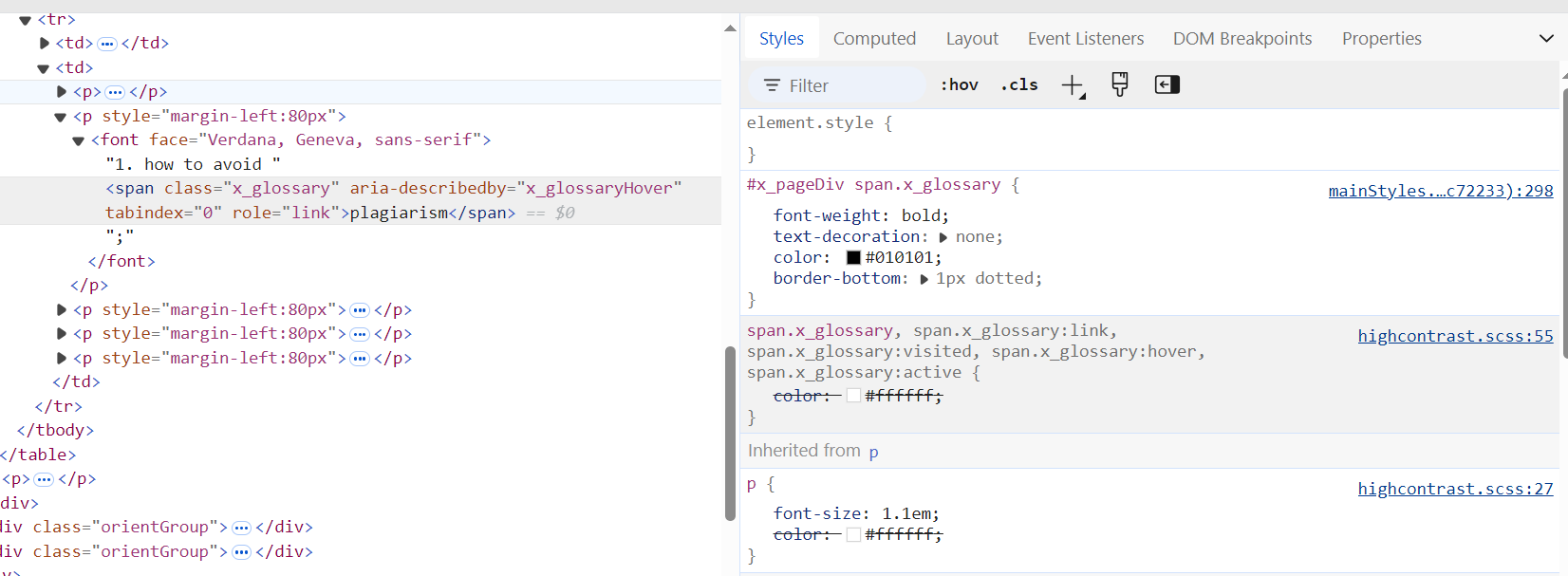
Issue: glossary terms in high contrast theme are invisible as they are in black (image 1). In the high contrast stylesheet it seems that glossary terms should appear in white (image 2). However, when inspecting the page (image 3), it seems as if the white text colour is disabled/overruled.
Main theme used: CESIcardiff
Xerte V3.12.33
Does anyone have an idea how to solve this?
An initial thought was that it may have to do with the text being in a table. But, unfortunately, this issue occurs throughout all our learning objects, including plain text.
Thank you in advance!
Issue: glossary terms in high contrast theme are invisible as they are in black (image 1). In the high contrast stylesheet it seems that glossary terms should appear in white (image 2). However, when inspecting the page (image 3), it seems as if the white text colour is disabled/overruled.
Main theme used: CESIcardiff
Xerte V3.12.33
Does anyone have an idea how to solve this?
An initial thought was that it may have to do with the text being in a table. But, unfortunately, this issue occurs throughout all our learning objects, including plain text.
Thank you in advance!

Graag Inloggen of een account aanmaken deelnemen aan het gesprek.
- AnneVI
-
Onderwerp Auteur
- Offline
- Nieuw lid
-
Minder
Meer
- Berichten: 3
- Ontvangen bedankjes 1
2 jaren 1 maand geleden #9197
door AnneVI
Beantwoord door AnneVI in topic Invisible glossary terms in High contrast theme
We have found the solution!
We've added
span.x_glossary{color:revert !important;}
to the optional styles property at LO level.
We've added
span.x_glossary{color:revert !important;}
to the optional styles property at LO level.
De volgende gebruiker (s) zei dank u: xlearn
Graag Inloggen of een account aanmaken deelnemen aan het gesprek.
Moderators: ronm, julten, JohnSmith
Tijd voor maken pagina: 0.125 seconden