

- Berichten: 179
- Ontvangen bedankjes 0
This is the place for questions about learning design and pedagogy; how to use different page types for different purposes.
Interactivity > Interactive text page type question
- annem
-
 Onderwerp Auteur
- Offline
- Elite lid
-

Minder
Meer
4 jaren 10 maanden geleden #7686
door annem
Interactivity > Interactive text page type question werd gestart door annem
Hi Xerte Community,
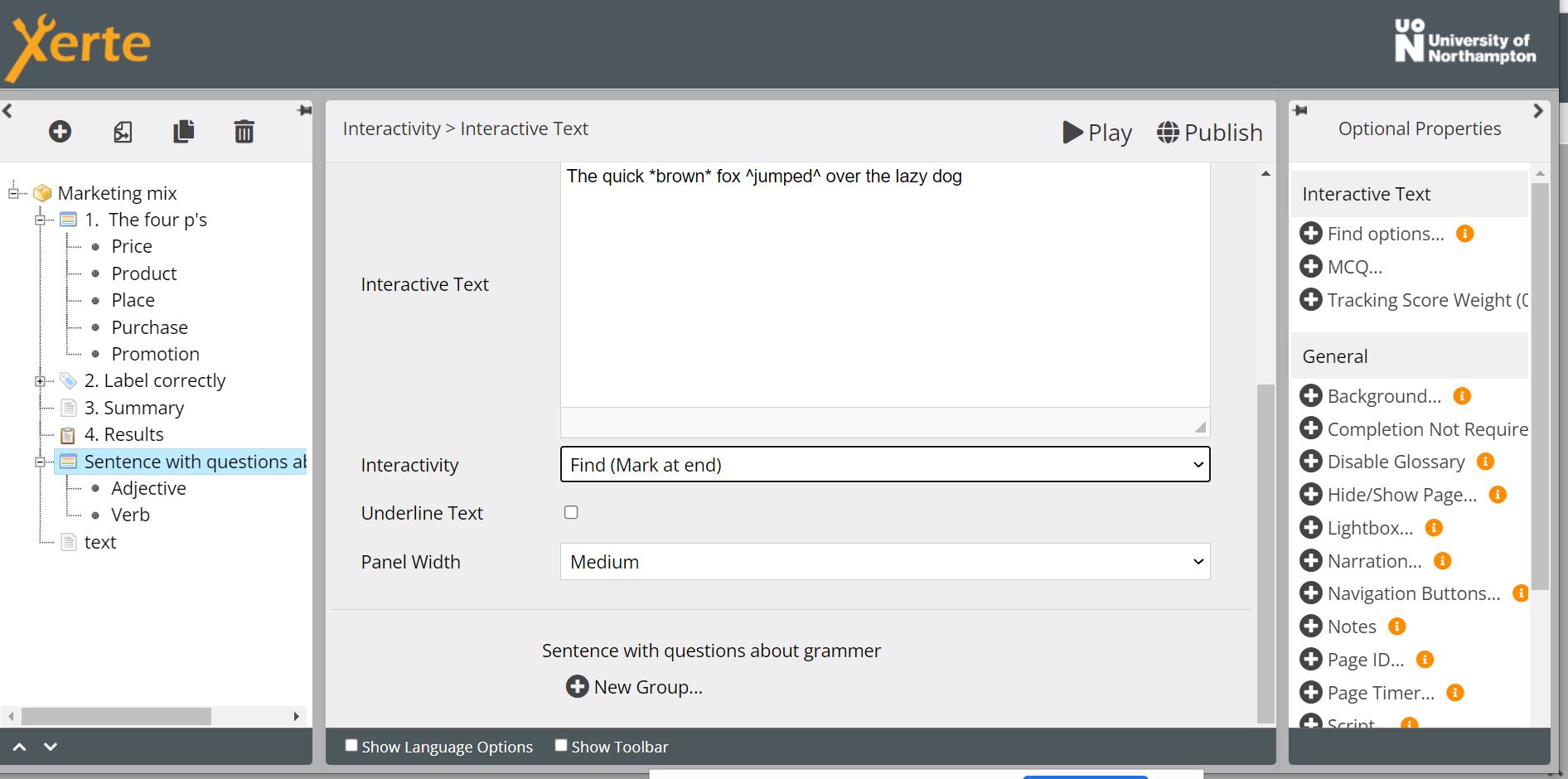
Hoping someone can help. Yesterday a colleague and I were working with the Interactive Text page type in Xerte.
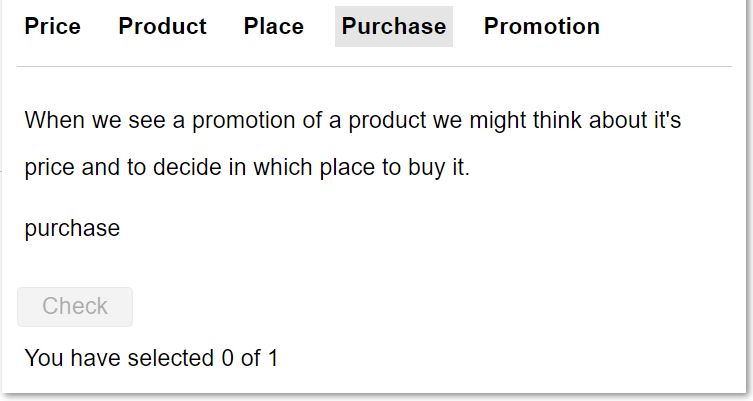
We noticed that when set up to Interactivity - Mark at End, when playing the Xerte a 'Checkbox' was displayed on the screen, but the Checkbox was not active.
Is this inactive button to be expected? Or are we doing something wrong? Or could this be a bug or issue?
I look forward to hearing from you. Screenshots are attached, the content displayed on the screenshots is demo only and not course content.
Best wishes
Anne
Hoping someone can help. Yesterday a colleague and I were working with the Interactive Text page type in Xerte.
We noticed that when set up to Interactivity - Mark at End, when playing the Xerte a 'Checkbox' was displayed on the screen, but the Checkbox was not active.
Is this inactive button to be expected? Or are we doing something wrong? Or could this be a bug or issue?
I look forward to hearing from you. Screenshots are attached, the content displayed on the screenshots is demo only and not course content.
Best wishes
Anne
Graag Inloggen of een account aanmaken deelnemen aan het gesprek.
- ronm
-

- Offline
- Administrator
-

4 jaren 10 maanden geleden - 4 jaren 10 maanden geleden #7687
door ronm
Xerte developer & trainer
e-learning & m-learning consultant
mitchellmedia.co.uk | xerteacademy.com | learningapps.co.uk
Note: Support here is voluntary and meant for users to support each other.
Need direct commercial support with Xerte? mitchellmedia.co.uk/contact/
Beantwoord door ronm in topic Interactivity > Interactive text page type question
Hi Anne
this is not a bug or an issue and you are not doing something wrong but by setting mark at end you are telling the interaction to behave in this way. You can see the impact of the different options just by changing and then testing those settings e.g.
With mark at end you see your selections but as you go not whether they are correct or wrong.
e.g. the feedback simply says You have selected 3 of 3 not whether those selections are correct or wrong.
Once you've interacted with each of the groups the check button becomes active which you can then select and see your results including correct and wrong answers.
Without mark at end selected you see your results as you go
e.g. You have found 3 of 3 with colour change and strikethrough indicating which are correct and which are wrong.
From a learning design perspective you simply need to decide which suits your objectives best at that point in the sequence. There are obviously other options in addition to Find and Find - (Mark at end) I would suggest creating a test LO and duplicating the page and then changing to each option so that you can see the difference.
HTH
Ron.
this is not a bug or an issue and you are not doing something wrong but by setting mark at end you are telling the interaction to behave in this way. You can see the impact of the different options just by changing and then testing those settings e.g.
With mark at end you see your selections but as you go not whether they are correct or wrong.
e.g. the feedback simply says You have selected 3 of 3 not whether those selections are correct or wrong.
Once you've interacted with each of the groups the check button becomes active which you can then select and see your results including correct and wrong answers.
Without mark at end selected you see your results as you go
e.g. You have found 3 of 3 with colour change and strikethrough indicating which are correct and which are wrong.
From a learning design perspective you simply need to decide which suits your objectives best at that point in the sequence. There are obviously other options in addition to Find and Find - (Mark at end) I would suggest creating a test LO and duplicating the page and then changing to each option so that you can see the difference.
HTH
Ron.
Xerte developer & trainer
e-learning & m-learning consultant
mitchellmedia.co.uk | xerteacademy.com | learningapps.co.uk
Note: Support here is voluntary and meant for users to support each other.
Need direct commercial support with Xerte? mitchellmedia.co.uk/contact/
Laatst bewerkt 4 jaren 10 maanden geleden door ronm.
Graag Inloggen of een account aanmaken deelnemen aan het gesprek.
- annem
-
Onderwerp Auteur
- Offline
- Elite lid
-
Minder
Meer
- Berichten: 179
- Ontvangen bedankjes 0
4 jaren 10 maanden geleden - 4 jaren 10 maanden geleden #7688
door annem
Beantwoord door annem in topic Interactivity > Interactive text page type question
Hi Ron,
Thank you for the guidance. I have changed the interactivity to: Show Me (By name) and now I have the correct behaviour, without the Checkbox displaying.
I think I will use this page type more frequently, as i do like the various behaviours it provides depending on the interactivity setting chosen and what it can provide based on desired objectives.
Many thanks again.
Anne
Thank you for the guidance. I have changed the interactivity to: Show Me (By name) and now I have the correct behaviour, without the Checkbox displaying.
I think I will use this page type more frequently, as i do like the various behaviours it provides depending on the interactivity setting chosen and what it can provide based on desired objectives.
Many thanks again.
Anne
Laatst bewerkt 4 jaren 10 maanden geleden door annem.
Graag Inloggen of een account aanmaken deelnemen aan het gesprek.
Moderators: ingdon
Tijd voor maken pagina: 0.193 seconden