

- Berichten: 116
- Ontvangen bedankjes 1
The place for more technical questions for those who want to create new pagetypes or bespoke functionality.
Glossary Layout
- JaapJan
-
 Onderwerp Auteur
- Offline
- Premium lid
-

Minder
Meer
10 jaren 3 maanden geleden #3865
door JaapJan
Holy cow!
Glossary Layout werd gestart door JaapJan
Hi,
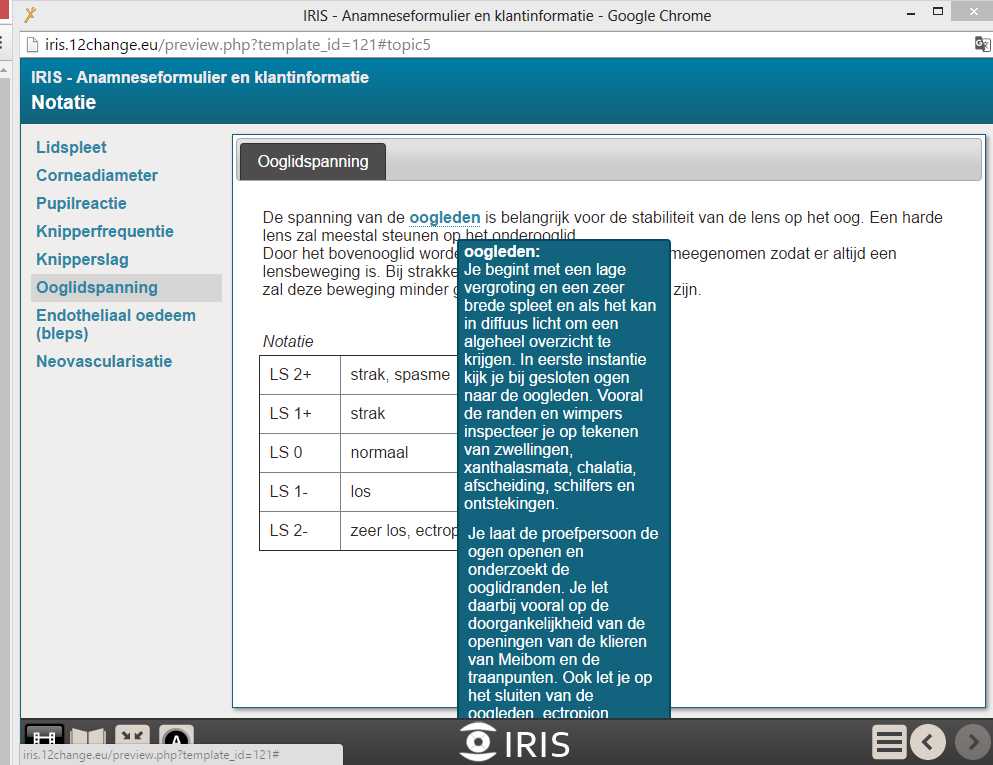
Is it possible to change the width of the 'glossary mouse-over screen'? There is too much text in it to fit on the page. See image.
Somebody with an idea?
JaapJan
Is it possible to change the width of the 'glossary mouse-over screen'? There is too much text in it to fit on the page. See image.
Somebody with an idea?
JaapJan
Holy cow!
Graag Inloggen of een account aanmaken deelnemen aan het gesprek.
- ronm
-

- Offline
- Administrator
-

10 jaren 3 maanden geleden #3866
door ronm
Xerte developer & trainer
e-learning & m-learning consultant
mitchellmedia.co.uk | xerteacademy.com | learningapps.co.uk
Note: Support here is voluntary and meant for users to support each other.
Need direct commercial support with Xerte? mitchellmedia.co.uk/contact/
Beantwoord door ronm in topic Glossary Layout
Add a styles optional property and then add the following:
Change the width to whatever you want including % rather than px
HTH
Ron
Code:
#x_glossaryHover {
display: none;
max-width: 400px;
}
Change the width to whatever you want including % rather than px
HTH
Ron
Xerte developer & trainer
e-learning & m-learning consultant
mitchellmedia.co.uk | xerteacademy.com | learningapps.co.uk
Note: Support here is voluntary and meant for users to support each other.
Need direct commercial support with Xerte? mitchellmedia.co.uk/contact/
De volgende gebruiker (s) zei dank u: JaapJan
Graag Inloggen of een account aanmaken deelnemen aan het gesprek.
- JaapJan
-
Onderwerp Auteur
- Offline
- Premium lid
-
Minder
Meer
- Berichten: 116
- Ontvangen bedankjes 1
10 jaren 3 maanden geleden #3871
door JaapJan
Holy cow!
Beantwoord door JaapJan in topic Glossary Layout
Thanks Ron
Wonderfull! Another question:
Is it possible to relink it form the position the glossary-word has in the page? When the glossary-word is shown at the right of the screen, the popup from the glossary is also positioned at the right.
Thanks
JaapJan
Wonderfull! Another question:
Is it possible to relink it form the position the glossary-word has in the page? When the glossary-word is shown at the right of the screen, the popup from the glossary is also positioned at the right.
Thanks
JaapJan
Holy cow!
Graag Inloggen of een account aanmaken deelnemen aan het gesprek.
- ronm
-
- Offline
- Administrator
-
10 jaren 3 maanden geleden #3877
door ronm
Xerte developer & trainer
e-learning & m-learning consultant
mitchellmedia.co.uk | xerteacademy.com | learningapps.co.uk
Note: Support here is voluntary and meant for users to support each other.
Need direct commercial support with Xerte? mitchellmedia.co.uk/contact/
Beantwoord door ronm in topic Glossary Layout
Even when the term is on the right the definition should shift so that it isn't off the screen? Not sure what the problem is? You could possibly try a margin-right value but I think the pop-up is positioned dynamically via js so not sure there's a simple solution.
Xerte developer & trainer
e-learning & m-learning consultant
mitchellmedia.co.uk | xerteacademy.com | learningapps.co.uk
Note: Support here is voluntary and meant for users to support each other.
Need direct commercial support with Xerte? mitchellmedia.co.uk/contact/
Graag Inloggen of een account aanmaken deelnemen aan het gesprek.
- JaapJan
-
Onderwerp Auteur
- Offline
- Premium lid
-
Minder
Meer
- Berichten: 116
- Ontvangen bedankjes 1
9 jaren 3 maanden geleden #4559
door JaapJan
Holy cow!
Beantwoord door JaapJan in topic Glossary Layout
Hey Ron
another one
Is it possible to change the title of the glossary popup window? Now it is named 'Glossary', but I use it for a kind of TOC
JaapJan
another one
Is it possible to change the title of the glossary popup window? Now it is named 'Glossary', but I use it for a kind of TOC
JaapJan
Holy cow!
Graag Inloggen of een account aanmaken deelnemen aan het gesprek.
- ronm
-
- Offline
- Administrator
-
9 jaren 3 maanden geleden #4562
door ronm
Xerte developer & trainer
e-learning & m-learning consultant
mitchellmedia.co.uk | xerteacademy.com | learningapps.co.uk
Note: Support here is voluntary and meant for users to support each other.
Need direct commercial support with Xerte? mitchellmedia.co.uk/contact/
Beantwoord door ronm in topic Glossary Layout
Hi JaapJan
we just had a team meeting and agreed that unfortunately this isn't something that is possible to change at this point but is now on our to do list for a future release e.g. to have language options attached to the LO where this could be changed in the same way that language options can be used on specific pages like quiz etc.
BW
Ron
we just had a team meeting and agreed that unfortunately this isn't something that is possible to change at this point but is now on our to do list for a future release e.g. to have language options attached to the LO where this could be changed in the same way that language options can be used on specific pages like quiz etc.
BW
Ron
Xerte developer & trainer
e-learning & m-learning consultant
mitchellmedia.co.uk | xerteacademy.com | learningapps.co.uk
Note: Support here is voluntary and meant for users to support each other.
Need direct commercial support with Xerte? mitchellmedia.co.uk/contact/
De volgende gebruiker (s) zei dank u: JaapJan
Graag Inloggen of een account aanmaken deelnemen aan het gesprek.
Moderators: JohnSmith
Tijd voor maken pagina: 0.145 seconden