

- Berichten: 73
- Ontvangen bedankjes 0
The place for more technical questions for those who want to create new pagetypes or bespoke functionality.
Tables on navigation pages
- 0kee
-
 Onderwerp Auteur
- Offline
- Senior lid
-

Minder
Meer
12 jaren 10 maanden geleden #967
door 0kee
Tables on navigation pages werd gestart door 0kee
Hi,
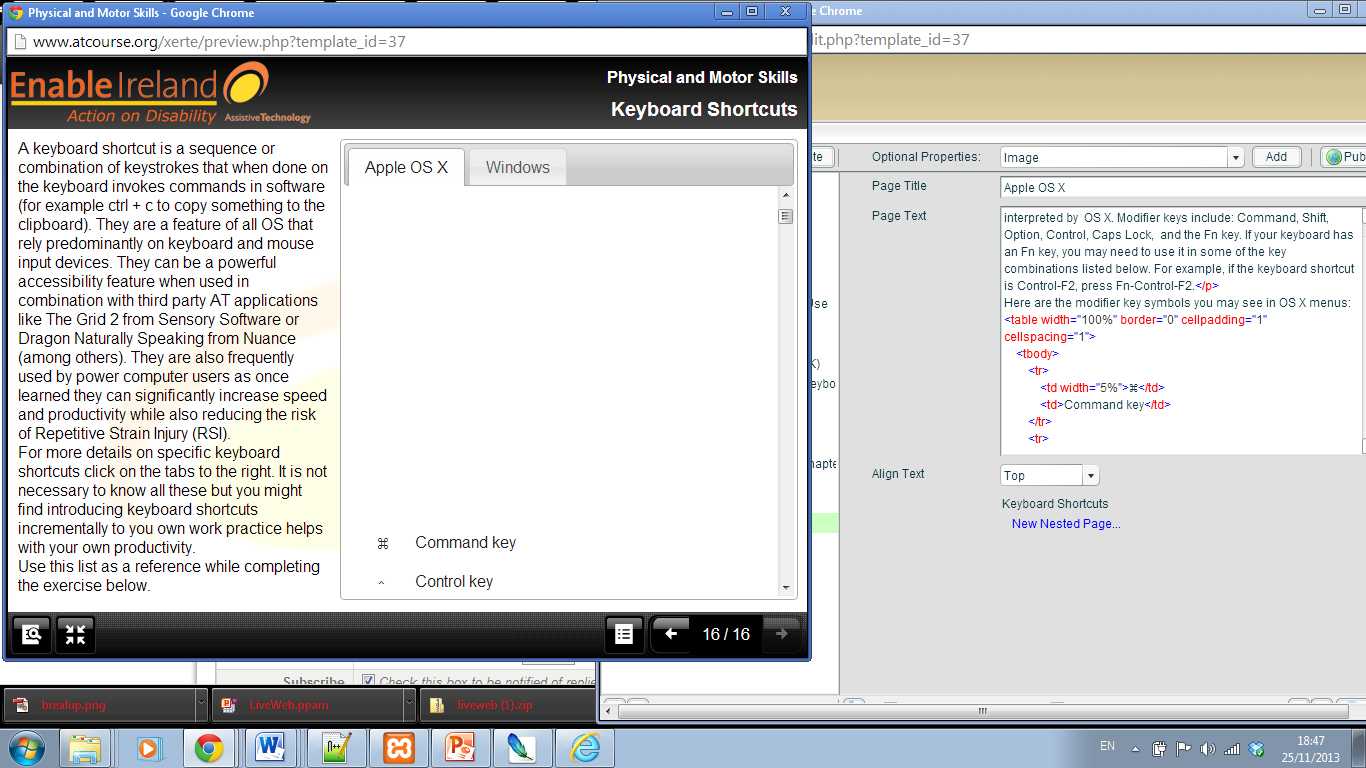
I need to put a couple of tables on one of the navigator page types (tabbed navigator). When I have added the table (html) and go to preview there is always a large blank area before each table (see screen shot attached. Does anybody know why this is happening? Can anyone suggest a CSS fix for this?
Thanks,
Karl
I need to put a couple of tables on one of the navigator page types (tabbed navigator). When I have added the table (html) and go to preview there is always a large blank area before each table (see screen shot attached. Does anybody know why this is happening? Can anyone suggest a CSS fix for this?
Thanks,
Karl
Graag Inloggen of een account aanmaken deelnemen aan het gesprek.
- coursenligne
-
- Offline
- Senior lid
-
Minder
Meer
- Berichten: 43
- Ontvangen bedankjes 3
12 jaren 10 maanden geleden - 12 jaren 10 maanden geleden #971
door coursenligne
If I can help I will do for sure...
Beantwoord door coursenligne in topic Tables on navigation pages
Hi,
First question : what is the software version you are using?
It seems that this is through XOT,is that right?
Second question: I can see in your attachment that there is text before the table. The image however seems to show near the top of the page and the text doesn't seem to show-up.
Is there an issue here?
What abourt replacing the tags <p> </p> (the 2 of them) with a simple <br \>?
I would have a go with this.
Last but not least, can you tell me the category (the type of object) you inserted, I would then be able to have a quick look locally here (when I have a couple of minutes free )
)
First question : what is the software version you are using?
It seems that this is through XOT,is that right?
Second question: I can see in your attachment that there is text before the table. The image however seems to show near the top of the page and the text doesn't seem to show-up.
Is there an issue here?
What abourt replacing the tags <p> </p> (the 2 of them) with a simple <br \>?
I would have a go with this.
Last but not least, can you tell me the category (the type of object) you inserted, I would then be able to have a quick look locally here (when I have a couple of minutes free
) If I can help I will do for sure...
Laatst bewerkt 12 jaren 10 maanden geleden door coursenligne. Reden: bad tag mention!!!
Graag Inloggen of een account aanmaken deelnemen aan het gesprek.
- 0kee
-
Onderwerp Auteur
- Offline
- Senior lid
-
Minder
Meer
- Berichten: 73
- Ontvangen bedankjes 0
12 jaren 10 maanden geleden #976
door 0kee
Beantwoord door 0kee in topic Tables on navigation pages
Hi Eric,
Thanks for taking the time to look at this. Yes we're using XOL 2.0. The problem is that blank area above the table. I enter the table code
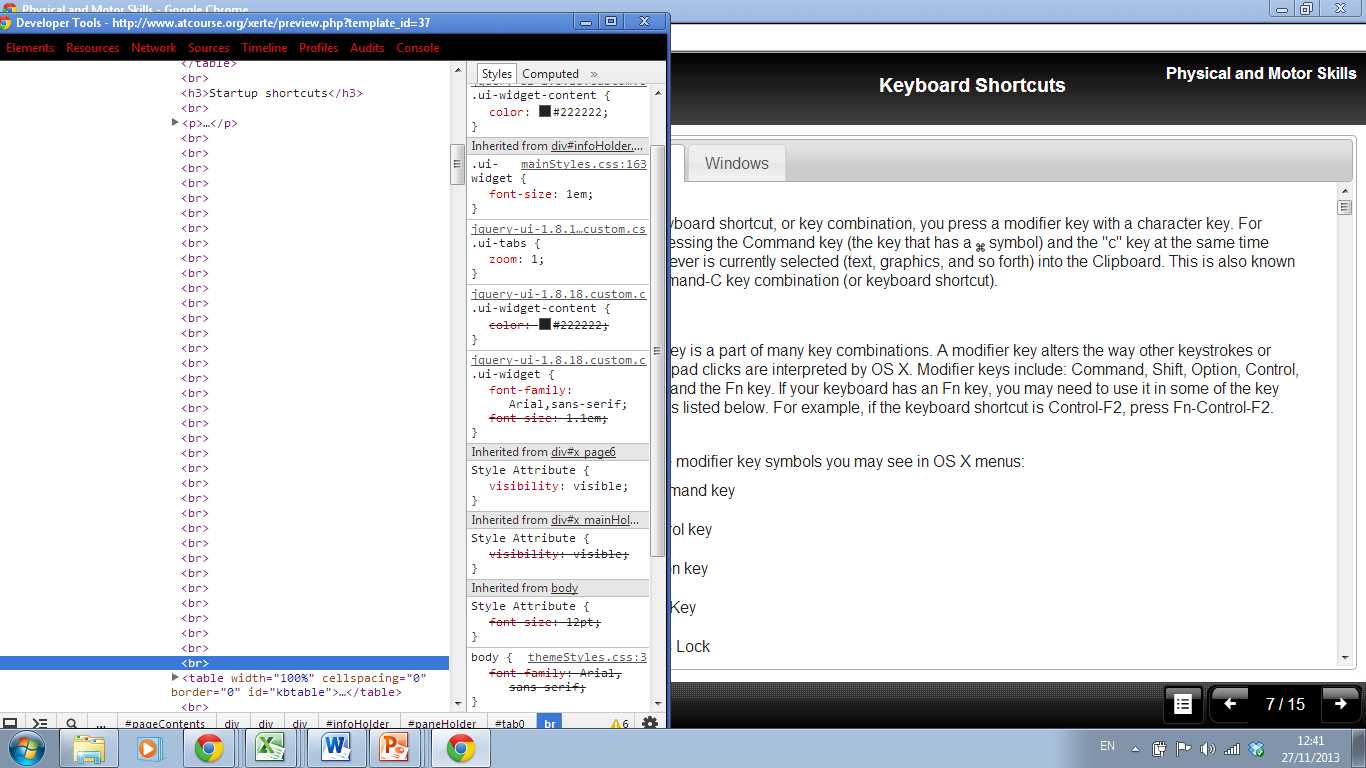
etc. and the table itself displays fine but it is the large blank area is above it that is the problem. For some reason multiple <br> are being added between the text and the table (see attached). I was hoping someone had a quick CSS fix?
Cheers
Thanks for taking the time to look at this. Yes we're using XOL 2.0. The problem is that blank area above the table. I enter the table code
Code:
Here are the modifier key symbols you may see in OS X menus:
<table width="100%" border="0" cellpadding="1" cellspacing="1">
<tbody>
<tr>
<td width="5%">⌘</td>
<td>Command key</td>
</tr>
<tr>
<td width="5%">⌃</td>
<td>Control key</td>
Cheers
Graag Inloggen of een account aanmaken deelnemen aan het gesprek.
- 0kee
-
Onderwerp Auteur
- Offline
- Senior lid
-
Minder
Meer
- Berichten: 73
- Ontvangen bedankjes 0
12 jaren 10 maanden geleden #977
door 0kee
Beantwoord door 0kee in topic Tables on navigation pages
Hi Eric,
Thanks for taking the time to look at this. Yes we're using XOL 2.0. The problem is that blank area above the table. I enter the table code
etc. and the table itself displays fine but it is the large blank area is above it that is the problem. For some reason multiple <br> are being added between the text and the table (see attached). I was hoping someone had a quick fix?
Cheers
Thanks for taking the time to look at this. Yes we're using XOL 2.0. The problem is that blank area above the table. I enter the table code
Code:
Here are the modifier key symbols you may see in OS X menus:
<table width="100%" border="0" cellpadding="1" cellspacing="1">
<tbody>
<tr>
<td width="5%">⌘</td>
<td>Command key</td>
</tr>
<tr>
<td width="5%">⌃</td>
<td>Control key</td>
Cheers
Graag Inloggen of een account aanmaken deelnemen aan het gesprek.
- JohnSmith
-

- Offline
- Moderator
-

Minder
Meer
- Berichten: 397
- Ontvangen bedankjes 71
12 jaren 10 maanden geleden #979
door JohnSmith
Beantwoord door JohnSmith in topic Tables on navigation pages
ALL of your table code needs to be on the same line.
This is the problem with adding HTML in to fields that weren't designed to hold HTML... every line break between the <table></table> tags is converted to a <br /> and since these don't render between table lines they end up ABOVE the table...
Try changing
<table>
<tbody>
<tr> <td width="5%">⌘</td> <td>Command key</td> </tr>
<tr> <td width="5%"></td> <td>Command key</td> </tr>Etc
To
<table><tbody><tr> <td width="5%">⌘</td> <td>Command key</td> </tr><tr> <td width="5%"></td> <td>Command key</td> </tr>etc
This is the problem with adding HTML in to fields that weren't designed to hold HTML... every line break between the <table></table> tags is converted to a <br /> and since these don't render between table lines they end up ABOVE the table...
Try changing
<table>
<tbody>
<tr> <td width="5%">⌘</td> <td>Command key</td> </tr>
<tr> <td width="5%"></td> <td>Command key</td> </tr>Etc
To
<table><tbody><tr> <td width="5%">⌘</td> <td>Command key</td> </tr><tr> <td width="5%"></td> <td>Command key</td> </tr>etc
Graag Inloggen of een account aanmaken deelnemen aan het gesprek.
- coursenligne
-
- Offline
- Senior lid
-
Minder
Meer
- Berichten: 43
- Ontvangen bedankjes 3
12 jaren 10 maanden geleden #980
door coursenligne
If I can help I will do for sure...
Beantwoord door coursenligne in topic Tables on navigation pages
I would need to give a try on XOT, but I don't remember having this.
I guess that if you remove the <BR> (just as a test as this can't be an acceptable solution) they are coming back ??
I'm not convinced this is CSS related. Could you please point me out the tool you are using so I can give a try here?
Thanks...
Obviously others are more than welcome to help to troubleshoot (I'm far away from an expert!)
I guess that if you remove the <BR> (just as a test as this can't be an acceptable solution) they are coming back ??
I'm not convinced this is CSS related. Could you please point me out the tool you are using so I can give a try here?
Thanks...
Obviously others are more than welcome to help to troubleshoot (I'm far away from an expert!)
If I can help I will do for sure...
Graag Inloggen of een account aanmaken deelnemen aan het gesprek.
Moderators: JohnSmith
Tijd voor maken pagina: 0.172 seconden