

- Posts: 6
- Thank you received: 0
Report any technical problems you discover and discuss solutions.
Sorry, the author of this piece has yet to make it
- ckelleher
-
 Topic Author
- Offline
- New Member
-

Less
More
10 years 4 months ago #3858
by ckelleher
Sorry, the author of this piece has yet to make it was created by ckelleher
Hi, im hoping someone will be able to help with my problem
I have created a project for testing and set the access to public,
This is not updating in the publishing your project tab
Also when trying to access to URL for the project - i receive the following error:
Sorry, the author of this piece has yet to make it available
Has anyone seen this before?
I have created a project for testing and set the access to public,
This is not updating in the publishing your project tab
Also when trying to access to URL for the project - i receive the following error:
Sorry, the author of this piece has yet to make it available
Has anyone seen this before?
Please Log in or Create an account to join the conversation.
- Fay
-
- Offline
- Elite Member
-

Less
More
- Posts: 236
- Thank you received: 96
10 years 4 months ago #3859
by Fay
Replied by Fay on topic Sorry, the author of this piece has yet to make it
Have you clicked the Change Access button after changing to public? Does the project still show as public when you move off the access tab and back again?
Please Log in or Create an account to join the conversation.
- ckelleher
-
Topic Author
- Offline
- New Member
-
Less
More
- Posts: 6
- Thank you received: 0
10 years 4 months ago #3860
by ckelleher
Replied by ckelleher on topic Sorry, the author of this piece has yet to make it
Hi I have clicked change access after selecting public checkbox.
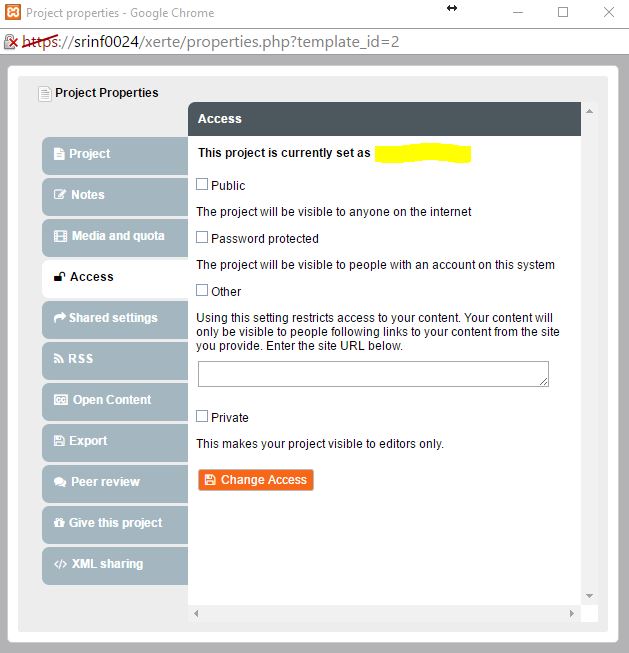
After going back onto the properties it does not show as being set to any (see attached access.jpg)
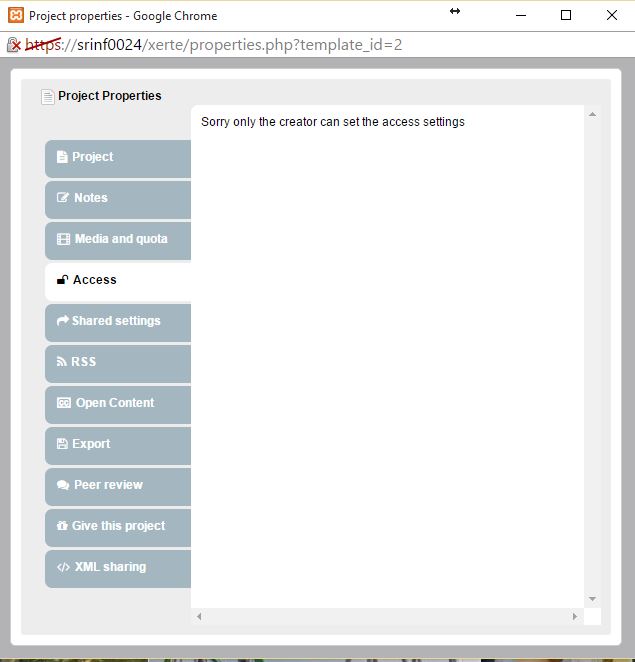
When trying to change the access again i get an error "Sorry only the creator can set the access settings" (see attached access2.jpg)
After going back onto the properties it does not show as being set to any (see attached access.jpg)
When trying to change the access again i get an error "Sorry only the creator can set the access settings" (see attached access2.jpg)
Please Log in or Create an account to join the conversation.
- ronm
-

- Offline
- Administrator
-

10 years 4 months ago #3861
by ronm
Xerte developer & trainer
e-learning & m-learning consultant
mitchellmedia.co.uk | xerteacademy.com | learningapps.co.uk
Note: Support here is voluntary and meant for users to support each other.
Need direct commercial support with Xerte? mitchellmedia.co.uk/contact/
Replied by ronm on topic Sorry, the author of this piece has yet to make it
Refresh the browser and if prompted log back in - sounds like your login session has expired?
Xerte developer & trainer
e-learning & m-learning consultant
mitchellmedia.co.uk | xerteacademy.com | learningapps.co.uk
Note: Support here is voluntary and meant for users to support each other.
Need direct commercial support with Xerte? mitchellmedia.co.uk/contact/
Please Log in or Create an account to join the conversation.
- ckelleher
-
Topic Author
- Offline
- New Member
-
Less
More
- Posts: 6
- Thank you received: 0
10 years 3 months ago #3878
by ckelleher
Replied by ckelleher on topic Sorry, the author of this piece has yet to make it
I have tried resetting the browser session, restarting the services (and server) and still receive the same error message.
Please Log in or Create an account to join the conversation.
- ronm
-
- Offline
- Administrator
-
10 years 3 months ago #3879
by ronm
Xerte developer & trainer
e-learning & m-learning consultant
mitchellmedia.co.uk | xerteacademy.com | learningapps.co.uk
Note: Support here is voluntary and meant for users to support each other.
Need direct commercial support with Xerte? mitchellmedia.co.uk/contact/
Replied by ronm on topic Sorry, the author of this piece has yet to make it
What authentication method are you using?
Does the project play ok from the workspace?
What browser are you using and do you get the same issue with all/different browsers? If IE what version?
If you create a new test project do you get the same problem?
Is the install public facing that we can access?
Sorry it's difficult to troubleshoot without more info but suffice to say this isn't a bug with the Xerte code so something not quite right with your configuration.
Does the project play ok from the workspace?
What browser are you using and do you get the same issue with all/different browsers? If IE what version?
If you create a new test project do you get the same problem?
Is the install public facing that we can access?
Sorry it's difficult to troubleshoot without more info but suffice to say this isn't a bug with the Xerte code so something not quite right with your configuration.
Xerte developer & trainer
e-learning & m-learning consultant
mitchellmedia.co.uk | xerteacademy.com | learningapps.co.uk
Note: Support here is voluntary and meant for users to support each other.
Need direct commercial support with Xerte? mitchellmedia.co.uk/contact/
Please Log in or Create an account to join the conversation.
Moderators: ronm, julten, JohnSmith
Time to create page: 0.127 seconds