

- Posts: 19
- Thank you received: 0
Report any technical problems you discover and discuss solutions.
Previous and Next arrows still show when disabled
- Nazryn
-
 Topic Author
- Offline
- New Member
-

Less
More
13 years 2 months ago #688
by Nazryn
Previous and Next arrows still show when disabled was created by Nazryn
Hi all,
I've been creating an online induction for students to work through when they begin their studies here at Newman. We've noticed that when you disable the arrows to move back and forward through the project, they still show in IE but they don't do anything when you click them. This is very confusing for the students as the buttons look as though they will work still and i'd like them greyed out or removed. Does anyone have the same problem? Or does anyone know how to remove them?
Thanks in advance!
I've been creating an online induction for students to work through when they begin their studies here at Newman. We've noticed that when you disable the arrows to move back and forward through the project, they still show in IE but they don't do anything when you click them. This is very confusing for the students as the buttons look as though they will work still and i'd like them greyed out or removed. Does anyone have the same problem? Or does anyone know how to remove them?
Thanks in advance!
Please Log in or Create an account to join the conversation.
- JohnSmith
-

- Offline
- Moderator
-

Less
More
- Posts: 397
- Thank you received: 71
13 years 2 months ago #689
by JohnSmith
Replied by JohnSmith on topic Previous and Next arrows still show when disabled
Hi,
What version of toolkits are you using (/version.txt)? And what Navigation type?
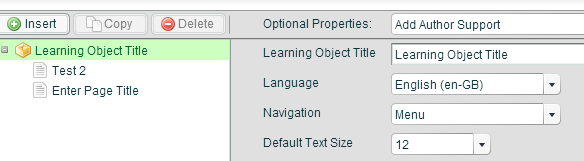
Works fine for me in IE10 on v2.0 (svn r1065)

John
What version of toolkits are you using (/version.txt)? And what Navigation type?
Works fine for me in IE10 on v2.0 (svn r1065)
John
Please Log in or Create an account to join the conversation.
- Nazryn
-
Topic Author
- Offline
- New Member
-
Less
More
- Posts: 19
- Thank you received: 0
13 years 2 months ago #690
by Nazryn
Replied by Nazryn on topic Previous and Next arrows still show when disabled
Hi John,
Thank you for your reply, it's version 2 that we are using, but we have version 9 of IE, so i think that's the problem!
Thanks again!
Nazryn
Thank you for your reply, it's version 2 that we are using, but we have version 9 of IE, so i think that's the problem!
Thanks again!
Nazryn
Please Log in or Create an account to join the conversation.
- JohnSmith
-
- Offline
- Moderator
-
Less
More
- Posts: 397
- Thank you received: 71
13 years 2 months ago #691
by JohnSmith
Replied by JohnSmith on topic Previous and Next arrows still show when disabled
Hmmm... not that i'm seeing in IE8 or IE9. Check Compatibility Mode as it can screw with the HTML...
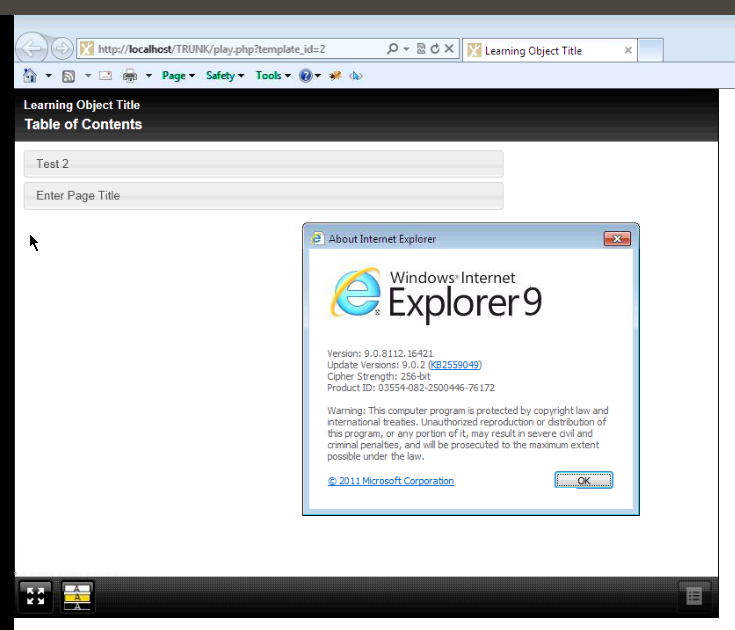

John
John
Please Log in or Create an account to join the conversation.
- Nazryn
-
Topic Author
- Offline
- New Member
-
Less
More
- Posts: 19
- Thank you received: 0
13 years 2 months ago #692
by Nazryn
Replied by Nazryn on topic Previous and Next arrows still show when disabled
How strange! I've just changed the settings in compatibility view and they're still there...
Thanks again
Thanks again
Please Log in or Create an account to join the conversation.
- JohnSmith
-
- Offline
- Moderator
-
Less
More
- Posts: 397
- Thank you received: 71
13 years 2 months ago #693
by JohnSmith
Replied by JohnSmith on topic Previous and Next arrows still show when disabled
You never told me what Navigation mode you are using? Is it 'Menu' like i'm using?
And what revision or v2. You'll find that out by going to /version.txt
John
And what revision or v2. You'll find that out by going to /version.txt
John
Please Log in or Create an account to join the conversation.
Moderators: ronm, julten, JohnSmith
Time to create page: 0.142 seconds