

- Berichten: 179
- Ontvangen bedankjes 0
Padlet in Xerte
- annem
-
 Onderwerp Auteur
- Offline
- Elite lid
-

Minder
Meer
5 jaren 1 maand geleden #7611
door annem
Padlet in Xerte werd gestart door annem
Hi All on the Xerte Community site,
I have a Padlet in a Xerte and I have used the keyboard to tab to the padlet text area and I have entered some text. I used the tab key to get to the text area, but it was a bit random. Once the text had been entered in to the Padlet, I could not work out if I press the Enter key, Spacebar to confirm that text entry in the Padlet. However, I have not spent much time testing today, and I will continue to test.
Can anyone provide advice and indication of how many times the end-user using a keyboard only has to press the tab key when entering text on a Padlet which has been embedded in to Xerte?
The good result is that I did eventually tab enough times to get the text entry area, but I do not see visual indications of where I am tabbing on the screen.
Any help is much appreciated. I have been testing in Chrome, and I need to check with other browsers (FireFox and Edge).
I look forward to hearing from you.
Best wishes
Anne
I have a Padlet in a Xerte and I have used the keyboard to tab to the padlet text area and I have entered some text. I used the tab key to get to the text area, but it was a bit random. Once the text had been entered in to the Padlet, I could not work out if I press the Enter key, Spacebar to confirm that text entry in the Padlet. However, I have not spent much time testing today, and I will continue to test.
Can anyone provide advice and indication of how many times the end-user using a keyboard only has to press the tab key when entering text on a Padlet which has been embedded in to Xerte?
The good result is that I did eventually tab enough times to get the text entry area, but I do not see visual indications of where I am tabbing on the screen.
Any help is much appreciated. I have been testing in Chrome, and I need to check with other browsers (FireFox and Edge).
I look forward to hearing from you.
Best wishes
Anne
Graag Inloggen of een account aanmaken deelnemen aan het gesprek.
- alimcn
-

- Offline
- Moderator
-

Minder
Meer
- Berichten: 24
- Ontvangen bedankjes 7
5 jaren 1 maand geleden #7615
door alimcn
Beantwoord door alimcn in topic Padlet in Xerte
I suspect this is a Padlet issue rather than a Xerte issue. I know Padlet is reported as having accessibility issues. Can you let me have a link to your LO and I'll have a go using Narrator and NVDA (though I'm not an expert user in either!). Send the link to me at alistair.mcnaught (at) outlook.com
Graag Inloggen of een account aanmaken deelnemen aan het gesprek.
- alimcn
-
- Offline
- Moderator
-
Minder
Meer
- Berichten: 24
- Ontvangen bedankjes 7
5 jaren 1 maand geleden - 5 jaren 1 maand geleden #7632
door alimcn
Beantwoord door alimcn in topic Padlet in Xerte
Hi Anne
The Padlet tab order is a nightmare! If you want to test tab order any time and you can't see Tab focus, use the Accessibility Insights plugin for Chrome
chrome.google.com/webstore/detail/access...akdaogkfomddhfmpjeni .
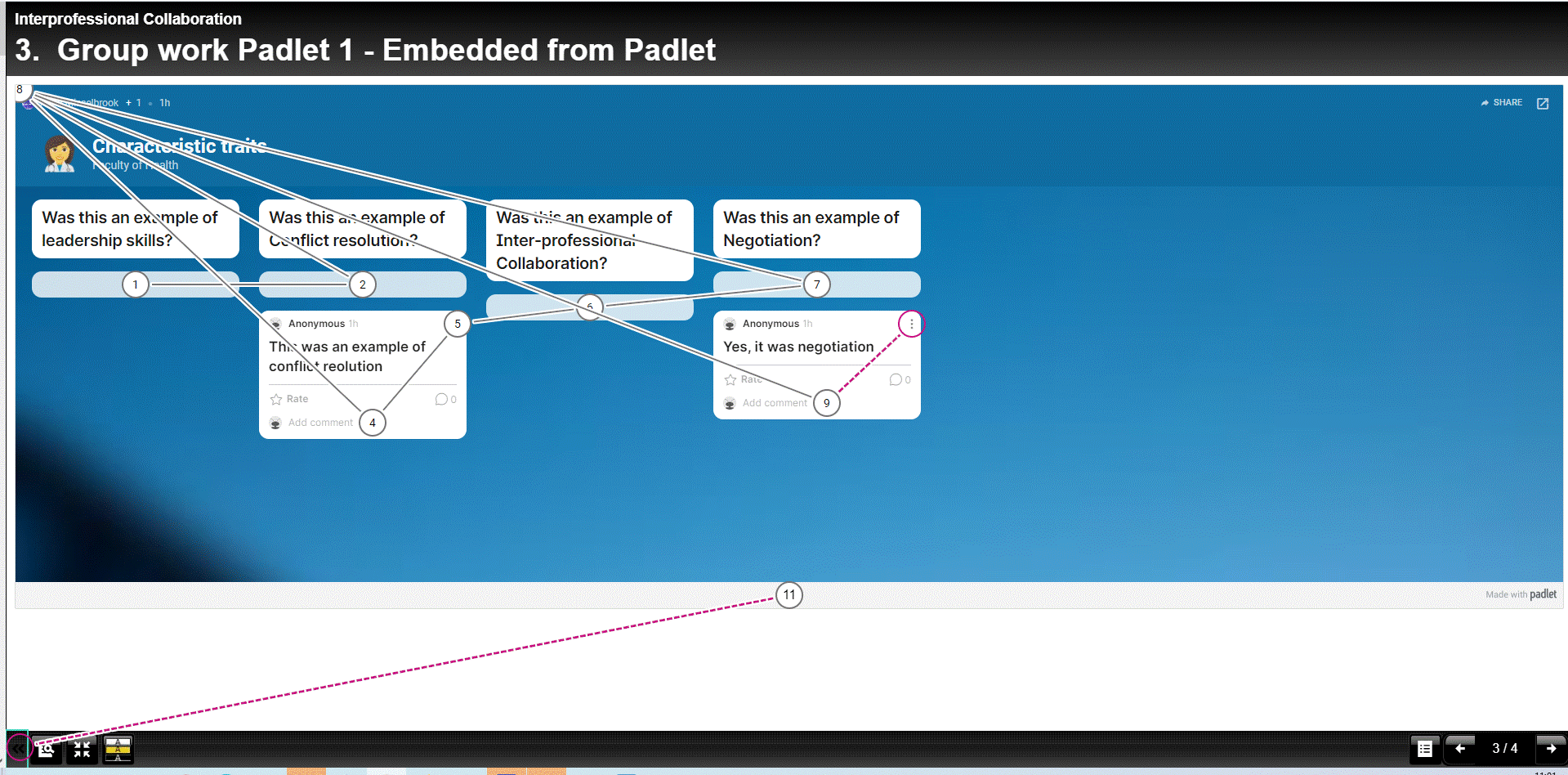
I attach an image of the Padlet Tab order as well as a document recording some testing I've been doing this morning. Ironically, the Padlet is more accessible to a blind person than a sighted non-mouse user! The document has more details as well as recommendations. The issue is very much Padlet rather than Xerte!
The Padlet tab order is a nightmare! If you want to test tab order any time and you can't see Tab focus, use the Accessibility Insights plugin for Chrome
chrome.google.com/webstore/detail/access...akdaogkfomddhfmpjeni .
I attach an image of the Padlet Tab order as well as a document recording some testing I've been doing this morning. Ironically, the Padlet is more accessible to a blind person than a sighted non-mouse user! The document has more details as well as recommendations. The issue is very much Padlet rather than Xerte!
Laatst bewerkt 5 jaren 1 maand geleden door alimcn. Reden: Added links
Graag Inloggen of een account aanmaken deelnemen aan het gesprek.
Moderators: ronm, alimcn
Tijd voor maken pagina: 0.278 seconden