

- Berichten: 36
- Ontvangen bedankjes 0
Questions on getting Xerte Toolkits installed on your server and questions about authentication and user logins.
Installation Issue
- Bernie123
-
 Onderwerp Auteur
- Offline
- Junior lid
-

Minder
Meer
13 jaren 4 dagen geleden #630
door Bernie123
Beantwoord door Bernie123 in topic Installation Issue
same error
the line I entered was:
grant all privileges on scsltdco_xerte.* to 'scsltdco'@'localhost' identified by 'XXXXXXX'
Substitute xxxxx for password
the line I entered was:
grant all privileges on scsltdco_xerte.* to 'scsltdco'@'localhost' identified by 'XXXXXXX'
Substitute xxxxx for password
Graag Inloggen of een account aanmaken deelnemen aan het gesprek.
- tom
-

- Offline
- Administrator
-

Minder
Meer
- Berichten: 1364
- Ontvangen bedankjes 344
13 jaren 4 dagen geleden #631
door tom
Beantwoord door tom in topic Installation Issue
Ah, sorry, miscommunication, my mistake.
What user is filled-in in database.php?
Login to phpMyAdmon/cpanel as root, or the user with administrative rights, and then do a
Where 'user' is the username you used in database.php and passwd the passwdord you used in database.php.
What user is filled-in in database.php?
Login to phpMyAdmon/cpanel as root, or the user with administrative rights, and then do a
Code:
grant all privileges on scsltdco_xerte.* to 'user'@'localhost' identified by 'passwd'
Where 'user' is the username you used in database.php and passwd the passwdord you used in database.php.
Graag Inloggen of een account aanmaken deelnemen aan het gesprek.
- Bernie123
-
Onderwerp Auteur
- Offline
- Junior lid
-
Minder
Meer
- Berichten: 36
- Ontvangen bedankjes 0
13 jaren 4 dagen geleden #632
door Bernie123
Beantwoord door Bernie123 in topic Installation Issue
Hi Tom,
Ok
grant all privileges on scsltdco_xerte.* to 'scsltdco_TESTUSE'@'localhost' identified by 'xxxxxx'
still gives:
#1044 - Access denied for user 'scsltdco'@'localhost' to database 'scsltdco_xerte'
Thanks for all your help but I think we have both spent too long on this
I can't understand why other SQL databases on same server are functioning fine.
I wish you the best with your product but I will need to move onto Lectoria I guess
Ok
grant all privileges on scsltdco_xerte.* to 'scsltdco_TESTUSE'@'localhost' identified by 'xxxxxx'
still gives:
#1044 - Access denied for user 'scsltdco'@'localhost' to database 'scsltdco_xerte'
Thanks for all your help but I think we have both spent too long on this
I can't understand why other SQL databases on same server are functioning fine.
I wish you the best with your product but I will need to move onto Lectoria I guess
Graag Inloggen of een account aanmaken deelnemen aan het gesprek.
- tom
-
- Offline
- Administrator
-
Minder
Meer
- Berichten: 1364
- Ontvangen bedankjes 344
13 jaren 4 dagen geleden - 13 jaren 4 dagen geleden #633
door tom
Beantwoord door tom in topic Installation Issue
! last attempt:
I have the feeling that somehow you filled in different credentials on page1.php and page2.php (see attachments)
Could you please modify database.php so that it uses the username and password you filled in on page1.php during installation.
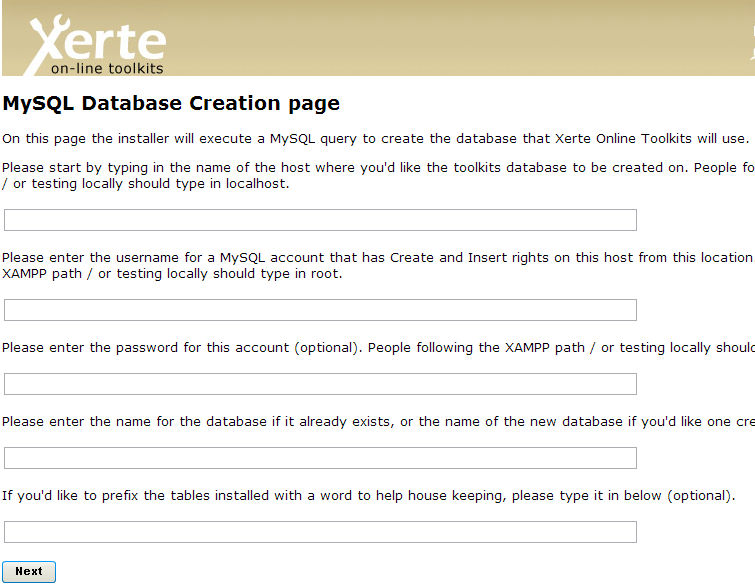
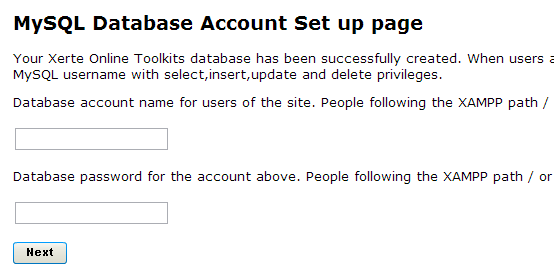
I have the feeling that somehow you filled in different credentials on page1.php and page2.php (see attachments)
Could you please modify database.php so that it uses the username and password you filled in on page1.php during installation.
Laatst bewerkt 13 jaren 4 dagen geleden door tom.
Graag Inloggen of een account aanmaken deelnemen aan het gesprek.
- Bernie123
-
Onderwerp Auteur
- Offline
- Junior lid
-
Minder
Meer
- Berichten: 36
- Ontvangen bedankjes 0
13 jaren 4 dagen geleden #634
door Bernie123
Beantwoord door Bernie123 in topic Installation Issue
* Host where database is
*/
$xerte_toolkits_site->database_host = "localhost";
/*
* Username for database
*/
$xerte_toolkits_site->database_username ="scsltdco_TESTUSE";
/*
* Password for database
*/
$xerte_toolkits_site->database_password ="xxxxxxxxx";
* password xxxxxxxx modified to conceal real one
/*
* Database name
*/
$xerte_toolkits_site->database_name ="scsltdco_xerte";
/*
* Database table prefix
*/
$xerte_toolkits_site->database_table_prefix ="";
*/
$xerte_toolkits_site->database_host = "localhost";
/*
* Username for database
*/
$xerte_toolkits_site->database_username ="scsltdco_TESTUSE";
/*
* Password for database
*/
$xerte_toolkits_site->database_password ="xxxxxxxxx";
* password xxxxxxxx modified to conceal real one
/*
* Database name
*/
$xerte_toolkits_site->database_name ="scsltdco_xerte";
/*
* Database table prefix
*/
$xerte_toolkits_site->database_table_prefix ="";
Graag Inloggen of een account aanmaken deelnemen aan het gesprek.
- Bernie123
-
Onderwerp Auteur
- Offline
- Junior lid
-
Minder
Meer
- Berichten: 36
- Ontvangen bedankjes 0
13 jaren 4 dagen geleden #635
door Bernie123
Beantwoord door Bernie123 in topic Installation Issue
Actually it seems it was the reverse I put in different admin name and password and it went through installation see attachment.
But the site s-c-s-ltd.co.uk/xertetoolkits/ fails to display
But the site s-c-s-ltd.co.uk/xertetoolkits/ fails to display
Graag Inloggen of een account aanmaken deelnemen aan het gesprek.
Tijd voor maken pagina: 0.147 seconden