

- Posts: 34
- Thank you received: 3
Report any technical problems you discover and discuss solutions.
Word list (Woordenlijst in Dutch) only partly displayed
- EAL
-
 Topic Author
- Offline
- Junior Member
-

Less
More
5 years 2 months ago #7565
by EAL
Word list (Woordenlijst in Dutch) only partly displayed was created by EAL
The list of words set at the start of the project, that will function as hypertext on all pages: called Woordenlijst in Dutch, I have no English version available at the moment.
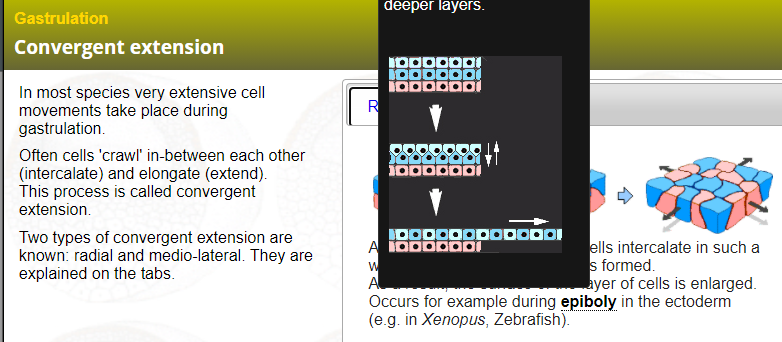
When displaying the extra information, this information is placed too high on the page so the top is cut off. See attachment. No way for the learners to see the full text.
What can I do? The image seems to be the problem...
When displaying the extra information, this information is placed too high on the page so the top is cut off. See attachment. No way for the learners to see the full text.
What can I do? The image seems to be the problem...
Please Log in or Create an account to join the conversation.
- ganthercage
-

- Offline
- New Member
-

Less
More
- Posts: 3
- Thank you received: 0
5 years 2 months ago - 5 years 2 months ago #7599
by ganthercage
Replied by ganthercage on topic Word list (Woordenlijst in Dutch) only partly displayed
try to switch it to english version and see what you can do from thereEAL wrote: The list of words set at the start of the project, that will function as hypertext on all pages: called Woordenlijst in Dutch, I have no English version available at the moment.
When displaying the extra information, this information is Nox Vidmate VLC placed too high on the page so the top is cut off. See attachment. No way for the learners to see the full text.
What can I do? The image seems to be the problem...
Last edit: 5 years 2 months ago by ganthercage.
Please Log in or Create an account to join the conversation.
- EAL
-
Topic Author
- Offline
- Junior Member
-
Less
More
- Posts: 34
- Thank you received: 3
5 years 2 months ago #7603
by EAL
Replied by EAL on topic Word list (Woordenlijst in Dutch) only partly displayed
My language IS set to English. No more that I can do about that.

Please Log in or Create an account to join the conversation.
- Fay
-
- Offline
- Elite Member
-

Less
More
- Posts: 236
- Thank you received: 96
5 years 2 months ago #7633
by Fay
Replied by Fay on topic Word list (Woordenlijst in Dutch) only partly displayed
There's no way around this at the moment. By default the glossary tooltips are positioned so that they appear below the linked word but then will move to above the word if there's not enough room below to accommodate it. In your example, the tooltip also can't fit above the word so appears cut off. We could try to get the positioning to be cleverer but depending on the size of the image and screen there still might not always be enough room. It's tricky because as the tooltips only appear when hovering over the word, you can't get it to scroll if there's not enough room to show it all on screen. I'll add this to our bug list so we can try to improve it it in a future release.
Please Log in or Create an account to join the conversation.
Moderators: ronm, julten, JohnSmith
Time to create page: 0.216 seconds