

- Posts: 8
- Thank you received: 0
Report any technical problems you discover and discuss solutions.
Glossary
- natchyos
-
 Topic Author
- Offline
- New Member
-

Less
More
3 years 7 months ago #8534
by natchyos
Glossary was created by natchyos
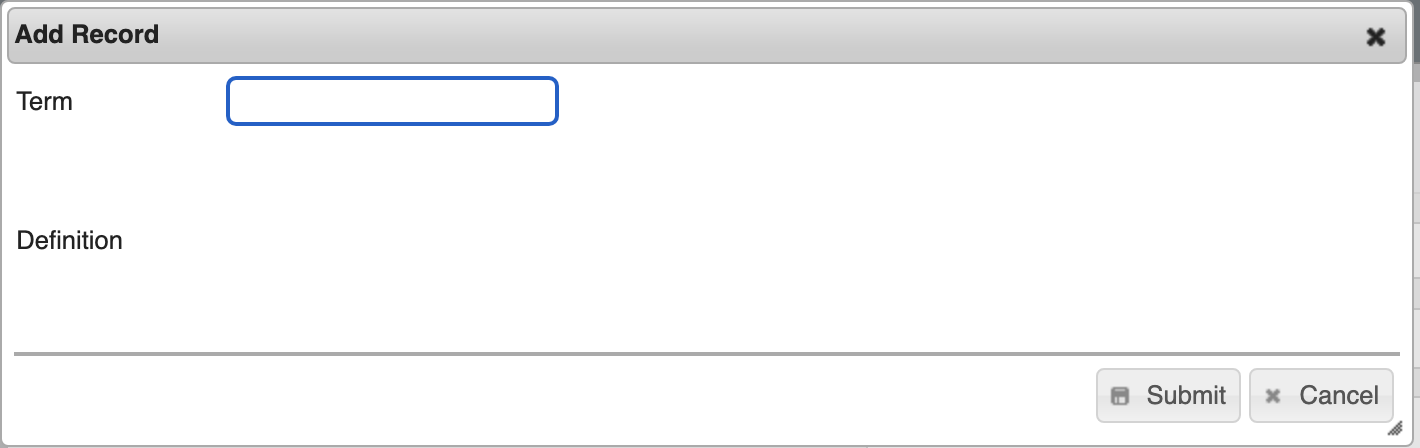
So far we have the glossary not working, the input where the definition of the word would be placed still does not appear on the screen. Will this be resolved in Xerte version 12? For me, the Glossary function is fundamental, it's a pity that it's not working, I'll have to uninstall Xerte 3.11 and install Xerte 3.09.
Please Log in or Create an account to join the conversation.
- ronm
-

- Offline
- Administrator
-

3 years 7 months ago #8535
by ronm
Xerte developer & trainer
e-learning & m-learning consultant
mitchellmedia.co.uk | xerteacademy.com | learningapps.co.uk
Note: Support here is voluntary and meant for users to support each other.
Need direct commercial support with Xerte? mitchellmedia.co.uk/contact/
Replied by ronm on topic Glossary
The glossary works fine in 3.11 as far as I'm aware.
Try Force Refresh and/or clearing offline files xerteacademy.com/xt/play_68#page1
Try Force Refresh and/or clearing offline files xerteacademy.com/xt/play_68#page1
Xerte developer & trainer
e-learning & m-learning consultant
mitchellmedia.co.uk | xerteacademy.com | learningapps.co.uk
Note: Support here is voluntary and meant for users to support each other.
Need direct commercial support with Xerte? mitchellmedia.co.uk/contact/
The following user(s) said Thank You: natchyos
Please Log in or Create an account to join the conversation.
- natchyos
-
Topic Author
- Offline
- New Member
-
Less
More
- Posts: 8
- Thank you received: 0
3 years 7 months ago #8536
by natchyos
Replied by natchyos on topic Glossary
Thx Mr. Ronm. I tried this too, and still not working.
Please Log in or Create an account to join the conversation.
- tom
-

- Offline
- Administrator
-
Less
More
- Posts: 1365
- Thank you received: 344
3 years 7 months ago #8537
by tom
Replied by tom on topic Glossary
I am not sure what the issue is. Your screenshot does show the Definition field. What happens if you fill in a Term and press tab to go the definition field?
I am trying to figure out whether the field is actually not there or if only the border is not shown.
I am trying to figure out whether the field is actually not there or if only the border is not shown.
Please Log in or Create an account to join the conversation.
Moderators: ronm, julten, JohnSmith
Time to create page: 0.160 seconds