

- Posts: 8
- Thank you received: 0
Report any technical problems you discover and discuss solutions.
Glossary Issues
- fionam
-
 Topic Author
- Offline
- New Member
-

Less
More
12 years 1 month ago - 12 years 1 month ago #2245
by fionam
Replied by fionam on topic Glossary Issues
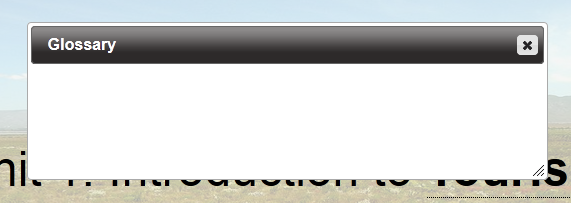
Thanks for your swift reply John. I have inserted the lines of code into xenith.js but the problem persists. I have attached the altered file - perhaps you will be able to see something. I noticed, after inserting the lines, that when I first mouseover one of the glossary links, the tooltip flickers but this only occurs once. When I go to select another glossary link the flickering doesn't recur. Not sure if that might point to something.
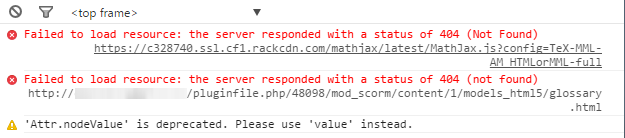
I have also attached two screen caps. One showing the glossary display issue and the other showing the errors reflected in the console when this issue occurs.
Edit: System didn't like the .js file I attached. I assume it saw it as potentially dangerous. I am using version 2.1 (git git-100-g1c55bea). Hope that helps.
I have also attached two screen caps. One showing the glossary display issue and the other showing the errors reflected in the console when this issue occurs.
Edit: System didn't like the .js file I attached. I assume it saw it as potentially dangerous. I am using version 2.1 (git git-100-g1c55bea). Hope that helps.
Last edit: 12 years 1 month ago by fionam.
Please Log in or Create an account to join the conversation.
- JohnSmith
-

- Offline
- Moderator
-

Less
More
- Posts: 397
- Thank you received: 71
12 years 1 month ago #2246
by JohnSmith
Replied by JohnSmith on topic Glossary Issues
Hi Fiona,
I suspect the flashing you are seeing is because the old file is still being served from the cache. Did you clear the cache? If so then it could be browser related but the fix I supplied should work in relatively modern Chrome/Firefox/IE versions. What browser/version are you using?
Also, looking at the screenshot of errors, you have the MathJax issue too which could be interfering with the SCORM engine (Tom can you remind Fiona of the patch for this) and to my eyes the glossary.html path doesn't look right to me (Tom would you know if this is the same place that all the other page files are placed?)
John
I suspect the flashing you are seeing is because the old file is still being served from the cache. Did you clear the cache? If so then it could be browser related but the fix I supplied should work in relatively modern Chrome/Firefox/IE versions. What browser/version are you using?
Also, looking at the screenshot of errors, you have the MathJax issue too which could be interfering with the SCORM engine (Tom can you remind Fiona of the patch for this) and to my eyes the glossary.html path doesn't look right to me (Tom would you know if this is the same place that all the other page files are placed?)
John
Please Log in or Create an account to join the conversation.
- fionam
-
Topic Author
- Offline
- New Member
-
Less
More
- Posts: 8
- Thank you received: 0
12 years 1 month ago #2247
by fionam
Replied by fionam on topic Glossary Issues
Hi John
Yes, it was a cache issue. Sorry about that, thought I had cleared it. Trying to do too many things at the same time!
It seems odd to me that the glossary pop-up is throwing a 404 error as the links are displaying the definitions. Or are the two not connected?
Yes, it was a cache issue. Sorry about that, thought I had cleared it. Trying to do too many things at the same time!
It seems odd to me that the glossary pop-up is throwing a 404 error as the links are displaying the definitions. Or are the two not connected?
Please Log in or Create an account to join the conversation.
- tom
-

- Offline
- Administrator
-

Less
More
- Posts: 1365
- Thank you received: 344
12 years 1 month ago #2248
by tom
Replied by tom on topic Glossary Issues
To fix the mathJax issue, see Ron's reply here:
www.xerte.org.uk/index.php?option=com_ku...mid=207&lang=en#2176
And the link to glossary is correct, but there was a problem in the past that the glossary.htm was not exported into the SCORM package.
www.xerte.org.uk/index.php?option=com_ku...mid=207&lang=en#2176
And the link to glossary is correct, but there was a problem in the past that the glossary.htm was not exported into the SCORM package.
Please Log in or Create an account to join the conversation.
- JohnSmith
-
- Offline
- Moderator
-
Less
More
- Posts: 397
- Thank you received: 71
12 years 1 month ago #2249
by JohnSmith
Replied by JohnSmith on topic Glossary Issues
Hi Fiona,
Yes, the two of them are in separate files, oddly enough and Tom's just cleared up why the glossary.html file isn't loading...
Tom, would you suggest updating a file just now, or waiting for the latest version? Or just patching the SCORM LO individually?
John
Yes, the two of them are in separate files, oddly enough and Tom's just cleared up why the glossary.html file isn't loading...
Tom, would you suggest updating a file just now, or waiting for the latest version? Or just patching the SCORM LO individually?
John
Please Log in or Create an account to join the conversation.
- fionam
-
Topic Author
- Offline
- New Member
-
Less
More
- Posts: 8
- Thank you received: 0
12 years 1 month ago #2250
by fionam
Replied by fionam on topic Glossary Issues
Hi Tom
Thanks for this. I have inserted the correct link in the files.
I also copied and pasted glossary.html into the correct location in the SCORM file. The glossary is now displaying when the SCO is launched in Moodle.
Is there perhaps a fix for the glossary.html export problem?
Thanks for this. I have inserted the correct link in the files.
I also copied and pasted glossary.html into the correct location in the SCORM file. The glossary is now displaying when the SCO is launched in Moodle.
Is there perhaps a fix for the glossary.html export problem?
Please Log in or Create an account to join the conversation.
Moderators: ronm, julten, JohnSmith
Time to create page: 0.213 seconds