

- Posts: 179
- Thank you received: 0
This is the place for questions about learning design and pedagogy; how to use different page types for different purposes.
Variable with name
- annem
-
 Topic Author
- Offline
- Elite Member
-

Less
More
8 years 2 months ago #5262
by annem
Variable with name was created by annem
Hi Xerte Community,
I would like to set a variable called Name to a static value of Anne and then wherever you want Anne to appear use [Name]. Then change the value of Name to something else and the new name will appear everywhere [Name] is used.
Please can someone give me instructions on what I add into the 'Variable' fields to be able to achieve this?
Thanks in advance
Anne
I would like to set a variable called Name to a static value of Anne and then wherever you want Anne to appear use [Name]. Then change the value of Name to something else and the new name will appear everywhere [Name] is used.
Please can someone give me instructions on what I add into the 'Variable' fields to be able to achieve this?
Thanks in advance
Anne
Please Log in or Create an account to join the conversation.
- Fay
-
- Offline
- Elite Member
-
Less
More
- Posts: 236
- Thank you received: 96
8 years 1 month ago #5315
by Fay
Replied by Fay on topic Variable with name
Hi Anne
There's no easy way to do this that doesn't require adding some code. Do you want your students to enter the new value for 'name'? If so them you can do something like this:
In the field where you want the input field to be:
And then add the script optional property to the page with this in it:
This will use the original value you set up for 'name' in all pages viewed before they press submit & the new value entered in the text field in all pages after they submit. However, if they return to a previously viewed page that includes [name] it will use the value of it before they changed it as the insertion of variables is only done on the first view of a page.
I hope this helps. I'd like to build in a better way of allowing variables to be changed by end users but am unlikely to have time for this for a while.
Fay
There's no easy way to do this that doesn't require adding some code. Do you want your students to enter the new value for 'name'? If so them you can do something like this:
In the field where you want the input field to be:
Code:
<p>My name is
<input id="nameField" name="name" type="text" />
<button id="submitBtn" onclick="submitName()">Submit
</button>
</p>
And then add the script optional property to the page with this in it:
Code:
for (var i=0; i<x_variables.length; i++) {
if (x_variables[i].name == 'name') {
nameVar = i;
break;
}
}
function submitName() {
if ($('#nameField').val() != '') {
x_variables[nameVar].value = $('#nameField').val();
}
}
This will use the original value you set up for 'name' in all pages viewed before they press submit & the new value entered in the text field in all pages after they submit. However, if they return to a previously viewed page that includes [name] it will use the value of it before they changed it as the insertion of variables is only done on the first view of a page.
I hope this helps. I'd like to build in a better way of allowing variables to be changed by end users but am unlikely to have time for this for a while.
Fay
Please Log in or Create an account to join the conversation.
- Fay
-
- Offline
- Elite Member
-
Less
More
- Posts: 236
- Thank you received: 96
8 years 1 month ago #5316
by Fay
Replied by Fay on topic Variable with name
Oh, and I should have said, in that example in the variables field you would just need to create a variable with the name of 'name' and a fixed value of 'Anne' and leave all the other fields blank.
Please Log in or Create an account to join the conversation.
- annem
-
Topic Author
- Offline
- Elite Member
-
Less
More
- Posts: 179
- Thank you received: 0
8 years 1 month ago #5329
by annem
Replied by annem on topic Variable with name
Hi Fay,
This is really helpful and useful, thank you so much.
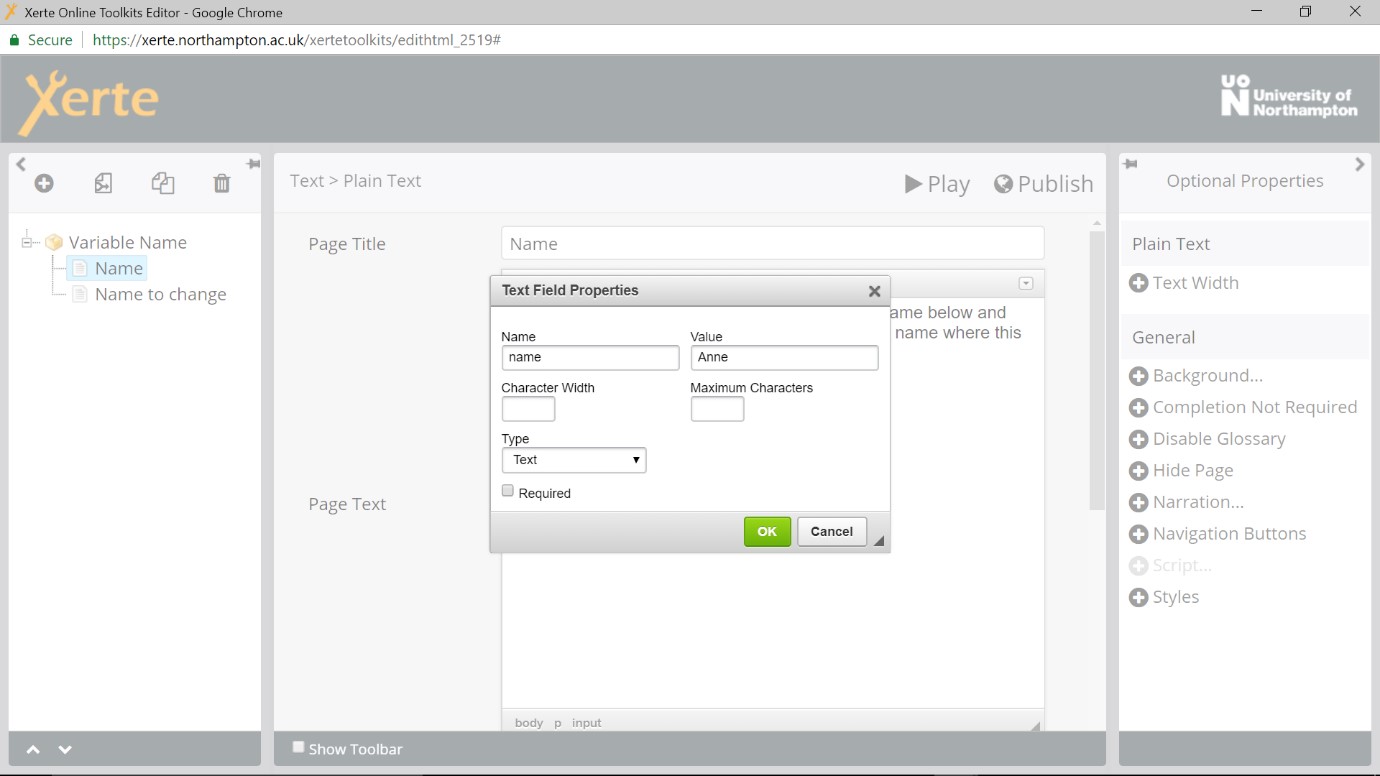
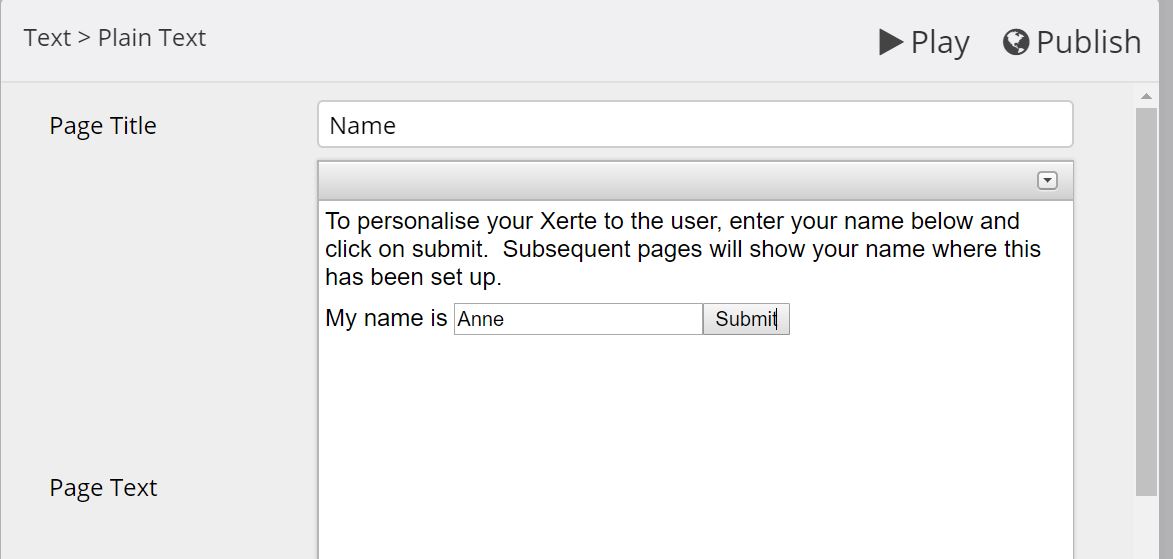
I notice on the 'Field' dialog box (when I double click on the 'submit' box in edit mode on the page, a text field dialog box is shown), that there are other 'type' options such as Email, Password, Search, Telephone Number.
My question for all on the forum....
So if I want a variable for email, for example, to be set up on a Learning Object, how do I adjust the HTML code and script for this? And how would I add this as a variable? Is this possible?
Thanks in advance for help with this.
Anne
This is really helpful and useful, thank you so much.
I notice on the 'Field' dialog box (when I double click on the 'submit' box in edit mode on the page, a text field dialog box is shown), that there are other 'type' options such as Email, Password, Search, Telephone Number.
My question for all on the forum....
So if I want a variable for email, for example, to be set up on a Learning Object, how do I adjust the HTML code and script for this? And how would I add this as a variable? Is this possible?
Thanks in advance for help with this.
Anne
Please Log in or Create an account to join the conversation.
- Fay
-
- Offline
- Elite Member
-
Less
More
- Posts: 236
- Thank you received: 96
8 years 1 month ago #5343
by Fay
Replied by Fay on topic Variable with name
I've not used the email type before but it seems to work so that if you were creating a proper html form with the submitted data being sent somewhere else it would check that what was entered here was in the correct format for an email address. This wouldn't really apply to this scenario as we're not properly 'submitting' data from a form. I would just leave any fields you want to be completed as the 'text' type.
I suspect what you might want though is for users to be able to complete more than one field on a page and have them saved to different variables. You'll need slightly different code for this:
1. Create as many variables as you need, each with a unique name and a default fixed value that can be used if the form isn't completed.
2. Create your fields in the html in this format, making sure that the names of the inputs match the variable names (e.g. a variable called 'email' would be entered in the input with the name 'email'):
3. Then paste these functions in the script optional property:
I hope this helps
Fay
I suspect what you might want though is for users to be able to complete more than one field on a page and have them saved to different variables. You'll need slightly different code for this:
1. Create as many variables as you need, each with a unique name and a default fixed value that can be used if the form isn't completed.
2. Create your fields in the html in this format, making sure that the names of the inputs match the variable names (e.g. a variable called 'email' would be entered in the input with the name 'email'):
Code:
<div id="myForm">
<p>Name:
<input name="name" type="text" />
</p>
<p>Email:
<input name="email" type="text" />
</p>
<p>Course:
<input name="course" type="text" />
</p>
<button id="submitBtn" onclick="submitForm('myForm')">Submit
</button>
</div>
3. Then paste these functions in the script optional property:
Code:
function lookupVar(id) {
for (var i=0; i<x_variables.length; i++) {
if (x_variables[i].name == id) {
return i;
break;
}
}
return null;
}
function submitForm(form) {
var $inputs = $('#' + form).find('input');
$inputs.each(function() {
var id = $(this).attr('name');
if ($(this).val() != '') {
var varIndex = lookupVar(id);
if (varIndex != null) {
x_variables[varIndex].value = $(this).val();
}
}
})
}
I hope this helps
Fay
Please Log in or Create an account to join the conversation.
- simonfokt
-
- Offline
- New Member
-

Less
More
- Posts: 8
- Thank you received: 1
7 years 9 months ago #5583
by simonfokt
Replied by simonfokt on topic Variable with name
This is really useful!
Can I have a follow up? Would it be possible to set up the 'submit' button in such a way that on press it would send the 'name', 'email', and 'course' values to a predetermined email address, perhaps with a note: 'this student started the test'?
Alternatively, could it add those values to some table which I could later access to see the details of all students who started the test?
Thanks!
Can I have a follow up? Would it be possible to set up the 'submit' button in such a way that on press it would send the 'name', 'email', and 'course' values to a predetermined email address, perhaps with a note: 'this student started the test'?
Alternatively, could it add those values to some table which I could later access to see the details of all students who started the test?
Thanks!
Please Log in or Create an account to join the conversation.
Moderators: ingdon
Time to create page: 0.143 seconds