

- Posts: 179
- Thank you received: 0
This is the place for questions about learning design and pedagogy; how to use different page types for different purposes.
Documentation - position of the 'Download' button
- annem
-
 Topic Author
- Offline
- Elite Member
-

Less
More
7 years 6 months ago #5687
by annem
Documentation - position of the 'Download' button was created by annem
Hi Xerte Community,
Is there a way of changing the default position of the 'Download' button on the 'Documentation' page type?
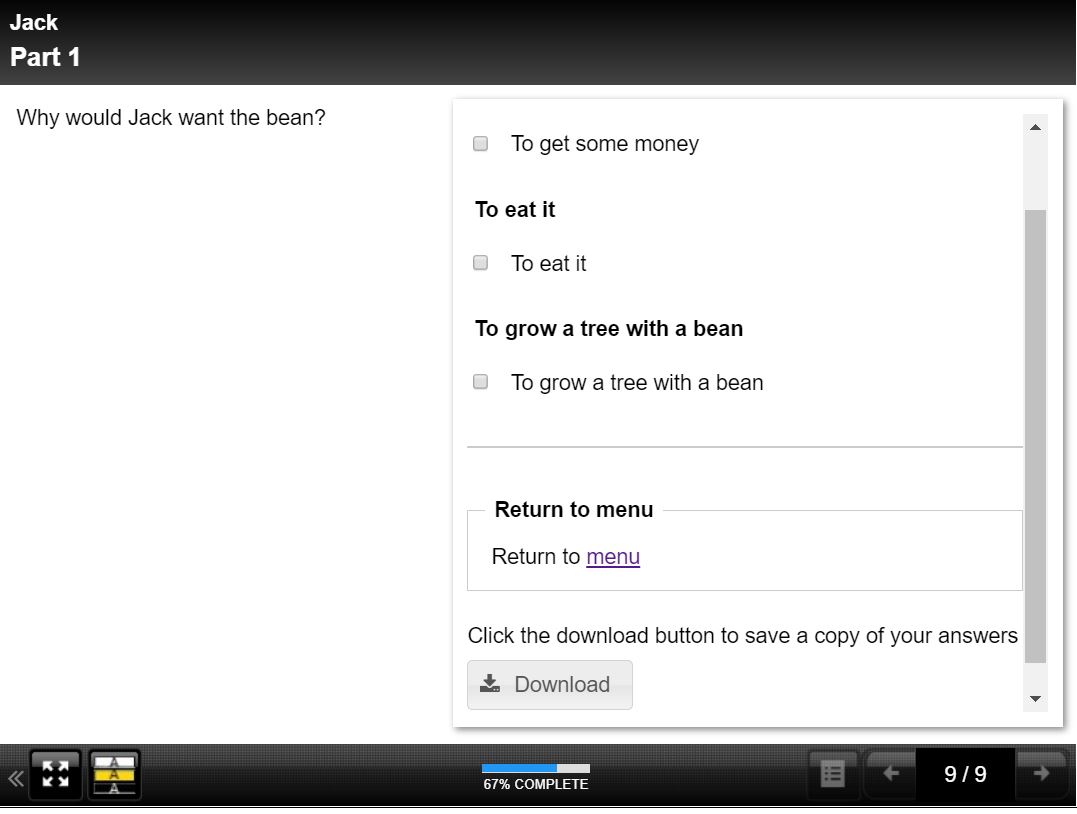
Attached is a screenshot of a simple test Xerte, whereby I am linking back from the Documentation page to a menu, but the link to menu I have added shows above the 'Download' button which displays in the defaulted position.
Thanks in advance for any help.
Anne
Is there a way of changing the default position of the 'Download' button on the 'Documentation' page type?
Attached is a screenshot of a simple test Xerte, whereby I am linking back from the Documentation page to a menu, but the link to menu I have added shows above the 'Download' button which displays in the defaulted position.
Thanks in advance for any help.
Anne
Please Log in or Create an account to join the conversation.
- Fay
-
- Offline
- Elite Member
-
Less
More
- Posts: 236
- Thank you received: 96
7 years 6 months ago #5688
by Fay
Replied by Fay on topic Documentation - position of the 'Download' button
Hi Anne
Try adding the script optional property to your page and using this:
This will move the download button section above the block above it which I think is what you want.
I hope this helps
Fay
Try adding the script optional property to your page and using this:
Code:
var $downloadBlock = $('#downloadBtn').parents('.item');
$downloadBlock.prev().before($downloadBlock);
This will move the download button section above the block above it which I think is what you want.
I hope this helps
Fay
Please Log in or Create an account to join the conversation.
- annem
-
Topic Author
- Offline
- Elite Member
-
Less
More
- Posts: 179
- Thank you received: 0
7 years 6 months ago #5689
by annem
Replied by annem on topic Documentation - position of the 'Download' button
Hi Fay,
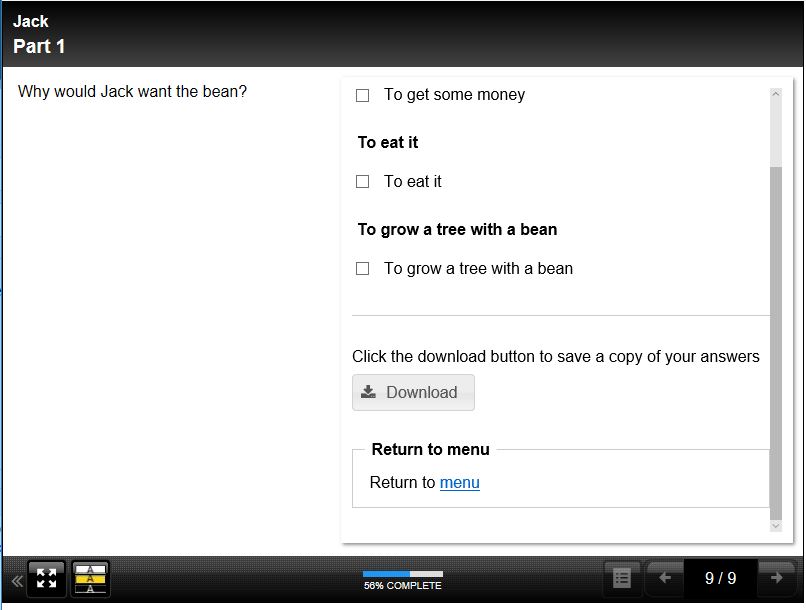
This is perfect, thank you. Attached is the view I was wanting to achieve and using the script code did it for me.
Excellent community support and feedback as usual.
Anne
This is perfect, thank you. Attached is the view I was wanting to achieve and using the script code did it for me.
Excellent community support and feedback as usual.
Anne
Please Log in or Create an account to join the conversation.
Moderators: ingdon
Time to create page: 0.134 seconds