

- Posts: 3
- Thank you received: 0
This is the place for questions about learning design and pedagogy; how to use different page types for different purposes.
Resizing a Xerte tutorial in Libguides
- damienmcmanus
-
 Topic Author
- Offline
- New Member
-

Less
More
6 years 6 months ago #6476
by damienmcmanus
Resizing a Xerte tutorial in Libguides was created by damienmcmanus
Hi, I'm putting together a libguide and want to use a Xerte tutorial. Inserting it is not problematic but resizing the tutorial to fit the window in libguides is defeating me - at present it's necessary to scroll right to start the tutorial which I'd like to fix.
Any guidance most welcome!
Any guidance most welcome!
Please Log in or Create an account to join the conversation.
- ronm
-

- Offline
- Administrator
-

6 years 6 months ago #6477
by ronm
Xerte developer & trainer
e-learning & m-learning consultant
mitchellmedia.co.uk | xerteacademy.com | learningapps.co.uk
Note: Support here is voluntary and meant for users to support each other.
Need direct commercial support with Xerte? mitchellmedia.co.uk/contact/
Replied by ronm on topic Resizing a Xerte tutorial in Libguides
Can you provide screenshots, links or further info re exactly what you mean?
What project template are you using? Are you using embed code or just a public link etc? What configuration/display options can you control in libguides?
HTH
Ron
What project template are you using? Are you using embed code or just a public link etc? What configuration/display options can you control in libguides?
HTH
Ron
Xerte developer & trainer
e-learning & m-learning consultant
mitchellmedia.co.uk | xerteacademy.com | learningapps.co.uk
Note: Support here is voluntary and meant for users to support each other.
Need direct commercial support with Xerte? mitchellmedia.co.uk/contact/
Please Log in or Create an account to join the conversation.
- damienmcmanus
-
Topic Author
- Offline
- New Member
-
Less
More
- Posts: 3
- Thank you received: 0
6 years 6 months ago #6479
by damienmcmanus
Replied by damienmcmanus on topic Resizing a Xerte tutorial in Libguides
Hello Ron thanks for your message. I'm pretty new to Libguides so don't know the answers to some of your questions, but:
I'm using the embed code, and a screenshot should be attached.
I'm using the embed code, and a screenshot should be attached.
Please Log in or Create an account to join the conversation.
- ronm
-
- Offline
- Administrator
-
6 years 6 months ago #6480
by ronm
Xerte developer & trainer
e-learning & m-learning consultant
mitchellmedia.co.uk | xerteacademy.com | learningapps.co.uk
Note: Support here is voluntary and meant for users to support each other.
Need direct commercial support with Xerte? mitchellmedia.co.uk/contact/
Replied by ronm on topic Resizing a Xerte tutorial in Libguides
Hi
it's not clear from those screenshots but if the issue is that the only available with is what's shown in your first screenshot then you might be better off linking to open the Xerte resource in a new window rather than embedding it.
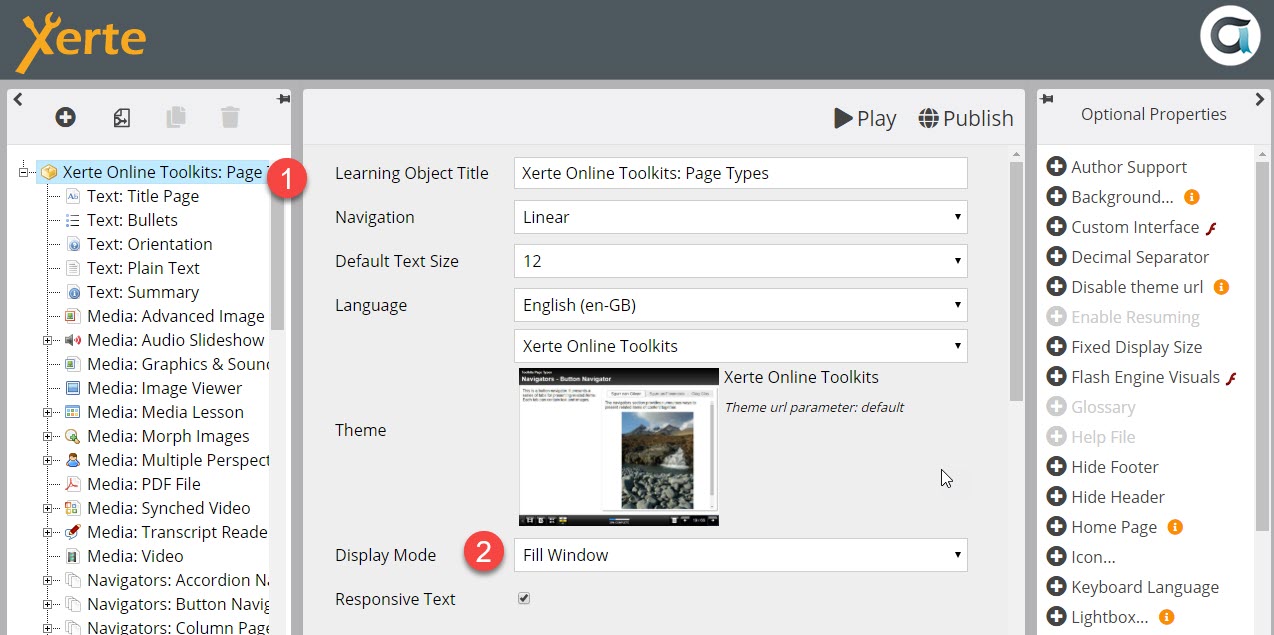
However make sure your Xerte resouce display mode is set to Fill window. e.g. edit in Xerte, select the first icon in the tree and make sure that Display mode is st to Fill window.
You could also try changing width="802" in the embed code to width="100%" but you still need to check/change display mode first.
HTH
Ron
it's not clear from those screenshots but if the issue is that the only available with is what's shown in your first screenshot then you might be better off linking to open the Xerte resource in a new window rather than embedding it.
However make sure your Xerte resouce display mode is set to Fill window. e.g. edit in Xerte, select the first icon in the tree and make sure that Display mode is st to Fill window.
You could also try changing width="802" in the embed code to width="100%" but you still need to check/change display mode first.
HTH
Ron
Xerte developer & trainer
e-learning & m-learning consultant
mitchellmedia.co.uk | xerteacademy.com | learningapps.co.uk
Note: Support here is voluntary and meant for users to support each other.
Need direct commercial support with Xerte? mitchellmedia.co.uk/contact/
Please Log in or Create an account to join the conversation.
- damienmcmanus
-
Topic Author
- Offline
- New Member
-
Less
More
- Posts: 3
- Thank you received: 0
6 years 6 months ago #6481
by damienmcmanus
Replied by damienmcmanus on topic Resizing a Xerte tutorial in Libguides
OK thanks - will see how I get on.
Please Log in or Create an account to join the conversation.
Moderators: ingdon
Time to create page: 0.141 seconds