

- Posts: 4
- Thank you received: 0
The place for more technical questions for those who want to create new pagetypes or bespoke functionality.
Bootstrap template background images
- azandbergen
-
 Topic Author
- Offline
- New Member
-

Less
More
8 years 9 months ago #4837
by azandbergen
Bootstrap template background images was created by azandbergen
Is it possible to adjust the background images in the topbanner (frame) per page (tab)?
Please Log in or Create an account to join the conversation.
- Fay
-
- Offline
- Elite Member
-

Less
More
- Posts: 236
- Thank you received: 96
8 years 9 months ago #4838
by Fay
Replied by Fay on topic Bootstrap template background images
I'm afraid there's no way of doing this at the moment but I'll add it to the wish list as I think this would be a nice feature.
Please Log in or Create an account to join the conversation.
- Neil Pollock
-
- Offline
- Premium Member
-

Less
More
- Posts: 92
- Thank you received: 4
8 years 9 months ago #4849
by Neil Pollock
The way I do it is to use a pseudo element for the jumbotron background image, then add the image-specific css to the top of each section.
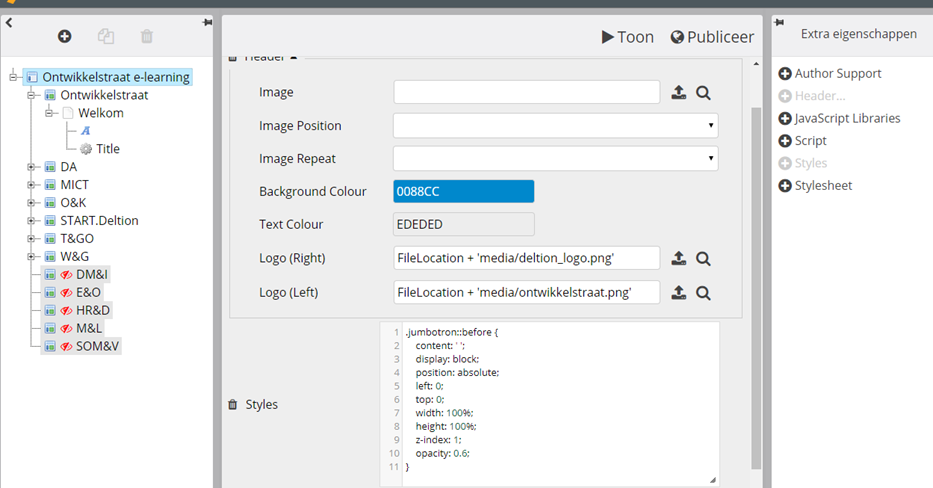
So, you could add this to apply to the whole project:
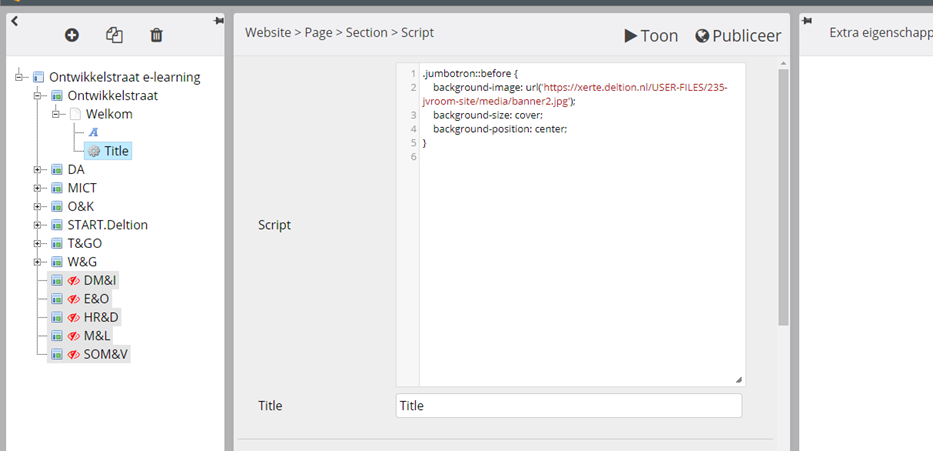
Then you could add this css to each section, with a different URL for each different background image:
Here's an example (I've adjusted the header so it fills the entire page, but the principle remains the same): xerte.cardiff.ac.uk/play_6542
Replied by Neil Pollock on topic Bootstrap template background images
Aaldrie Zandbergen wrote: Is it possible to adjust the background images in the topbanner (frame) per page (tab)?
The way I do it is to use a pseudo element for the jumbotron background image, then add the image-specific css to the top of each section.
So, you could add this to apply to the whole project:
Code:
.jumbotron::before {
content: ' ';
display: block;
position: absolute;
left: 0;
top: 0;
width: 100%;
height: 100%;
z-index: 1;
opacity: 0.6;
}
Then you could add this css to each section, with a different URL for each different background image:
Code:
.jumbotron::before {
background-image: url('...');
background-size: cover;
background-position: center;
}
Here's an example (I've adjusted the header so it fills the entire page, but the principle remains the same): xerte.cardiff.ac.uk/play_6542
Please Log in or Create an account to join the conversation.
- azandbergen
-
Topic Author
- Offline
- New Member
-
Less
More
- Posts: 4
- Thank you received: 0
8 years 9 months ago #4858
by azandbergen
Replied by azandbergen on topic Bootstrap template background images
Hi Neil,
Thats awesome!
I can add a style to the entire project, but no ccs to the sections. There is only the possibility to add a script. Can you help?
Best regards and
thank you in advance
Aaldrie Zandbergen
Deltion College
Zwolle / The Netherlands
Thats awesome!
I can add a style to the entire project, but no ccs to the sections. There is only the possibility to add a script. Can you help?
Best regards and
thank you in advance
Aaldrie Zandbergen
Deltion College
Zwolle / The Netherlands
Please Log in or Create an account to join the conversation.
- Neil Pollock
-
- Offline
- Premium Member
-
Less
More
- Posts: 92
- Thank you received: 4
8 years 9 months ago - 8 years 9 months ago #4859
by Neil Pollock
Replied by Neil Pollock on topic Bootstrap template background images
You can add section level CSS by adding a "New HTML Code..." page. Just add your CSS here but wrap it in <style> </style> tags. Make sure you untick the "Show Title" box.
A bit of a workaround, but it works, and still keeps the CSS sort of separate from the HTML...
A bit of a workaround, but it works, and still keeps the CSS sort of separate from the HTML...
Last edit: 8 years 9 months ago by Neil Pollock.
Please Log in or Create an account to join the conversation.
- azandbergen
-
Topic Author
- Offline
- New Member
-
Less
More
- Posts: 4
- Thank you received: 0
8 years 9 months ago #4860
by azandbergen
Replied by azandbergen on topic Bootstrap template background images
OK!
I can now adjust the headers of the pages, but how do I get the pictures fullscreen and small when scrolling the page?
I can now adjust the headers of the pages, but how do I get the pictures fullscreen and small when scrolling the page?
Please Log in or Create an account to join the conversation.
Moderators: JohnSmith
Time to create page: 0.161 seconds