

- Posts: 8
- Thank you received: 0
General questions and topics about Xerte Toolkits that don’t fit anywhere else.
Newbie questions
- atiff
-
 Topic Author
- Offline
- New Member
-

Less
More
7 years 11 months ago #5410
by atiff
Replied by atiff on topic Newbie questions
Awesome, thanks!
Please Log in or Create an account to join the conversation.
- atiff
-
Topic Author
- Offline
- New Member
-
Less
More
- Posts: 8
- Thank you received: 0
7 years 11 months ago #5430
by atiff
Replied by atiff on topic Newbie questions
Hi, another newbie question...
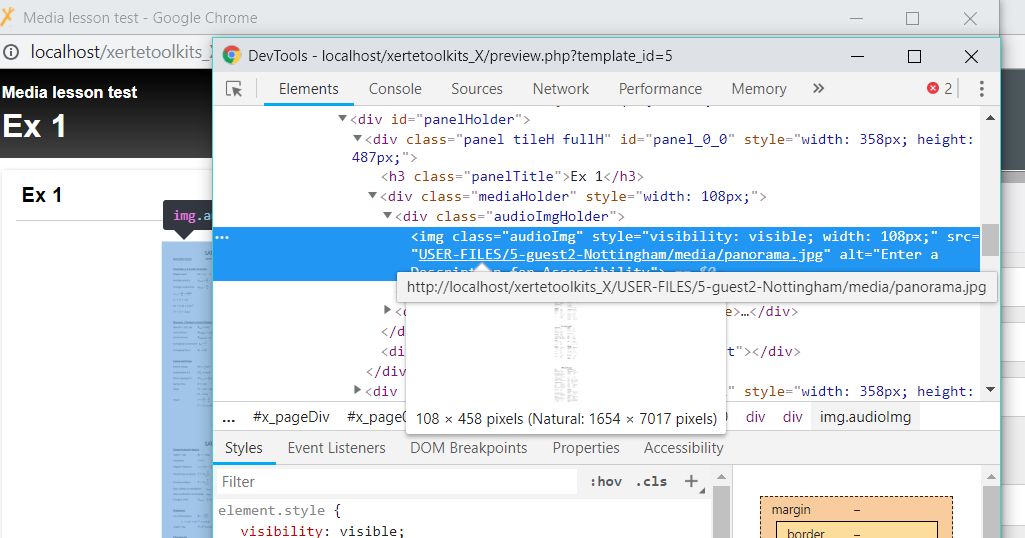
I'm making up a Media Lesson and wanting to insert an image in lieu of other media. The image is large (process diagram) but I can make it a vertical panorama, so I had hoped to make it 'tall and skinny' so it would fit width-wise within the Image Holder and be able to scroll vertically to see the whole thing in reasonable resolution. However, I'm see that the standard setting is that the image is resized into the borders (see attached image - using a placeholder). Hence the image is viewing as very reduced in size.
I searched and found this reference to resizing:
Video resizing
Can something be done with Styles like this for Media Lesson so as to allow 'auto' or a manual height setting to allow a long, skinny image to be viewed via vertical scroll? If so, can someone tell me how to address it in Styles to affect the change?
Thanks!
Andrew
I'm making up a Media Lesson and wanting to insert an image in lieu of other media. The image is large (process diagram) but I can make it a vertical panorama, so I had hoped to make it 'tall and skinny' so it would fit width-wise within the Image Holder and be able to scroll vertically to see the whole thing in reasonable resolution. However, I'm see that the standard setting is that the image is resized into the borders (see attached image - using a placeholder). Hence the image is viewing as very reduced in size.
I searched and found this reference to resizing:
Video resizing
Can something be done with Styles like this for Media Lesson so as to allow 'auto' or a manual height setting to allow a long, skinny image to be viewed via vertical scroll? If so, can someone tell me how to address it in Styles to affect the change?
Thanks!
Andrew
Please Log in or Create an account to join the conversation.
- Fay
-

- Offline
- Elite Member
-

Less
More
- Posts: 236
- Thank you received: 96
7 years 11 months ago #5431
by Fay
Replied by Fay on topic Newbie questions
Hi Andrew
Instead of adding your image by adding 'New Media', add 'New Text Content' & add it to the text field. You can then control the resizing yourself.
To add an image to a text field, click the arrow in the top right of the field to open the wysiwyg toolbar. There's an image button you can use to insert the image. By default this will fix the size of the image to the original but you can change the width to a percentage (100%). This will make the image always fill the width available so you should get the scrolling you need.
If this sometimes makes the image too big try editing the source (there's a source button on the wysiwyg toolbar) so that the html for the image looks something like this:
Fay
Instead of adding your image by adding 'New Media', add 'New Text Content' & add it to the text field. You can then control the resizing yourself.
To add an image to a text field, click the arrow in the top right of the field to open the wysiwyg toolbar. There's an image button you can use to insert the image. By default this will fix the size of the image to the original but you can change the width to a percentage (100%). This will make the image always fill the width available so you should get the scrolling you need.
If this sometimes makes the image too big try editing the source (there's a source button on the wysiwyg toolbar) so that the html for the image looks something like this:
Code:
<p><img alt="Description" style="max-width:100%;" src="http://yourinstall/USER-FILES/123/media/tall_img.png" />
</p>
Fay
Please Log in or Create an account to join the conversation.
- atiff
-
Topic Author
- Offline
- New Member
-
Less
More
- Posts: 8
- Thank you received: 0
7 years 11 months ago #5433
by atiff
Replied by atiff on topic Newbie questions
Thanks Fay, I will give that a try. Much appreciated!
Please Log in or Create an account to join the conversation.
- atiff
-
Topic Author
- Offline
- New Member
-
Less
More
- Posts: 8
- Thank you received: 0
7 years 11 months ago #5434
by atiff
Replied by atiff on topic Newbie questions
Actually, I found a hack-around using your idea. If I do what you described using Transcript in the Media panel, I can have just two panels (the default media panel with the image, and MCQs). This will work for what I want for now.
Please Log in or Create an account to join the conversation.
Moderators: ingdon
Time to create page: 0.156 seconds