

- Posts: 21
- Thank you received: 0
Questions on getting Xerte Toolkits installed on your server and questions about authentication and user logins.
Move Xerte installation to a new server?
- tsalyers
-
 Topic Author
- Offline
- Junior Member
-

Less
More
3 years 1 week ago #8741
by tsalyers
Move Xerte installation to a new server? was created by tsalyers
Hi, all.
I've got an installation of Xerte that I set up about six years ago and have kept upgraded, and it's been working great. However, the Linux distribution it's on has been discontinued, and there's no clear upgrade path, so it looks like I'm going to have to build another machine and then cut over to it.
However, after six years there's quite a bit of content stored in the system, as you might imagine. Is there any way to move an existing installation wholesale to a new server? I imagine dumping and restoring the database will take care of (e.g.) configuration settings and such, but what about the content?
Also, could I theoretically switch from Apache to Nginx? Is Xerte pretty web server-agnostic?
Please let me know if I need to elaborate on or clarify anything, and thanks in advance.
I've got an installation of Xerte that I set up about six years ago and have kept upgraded, and it's been working great. However, the Linux distribution it's on has been discontinued, and there's no clear upgrade path, so it looks like I'm going to have to build another machine and then cut over to it.
However, after six years there's quite a bit of content stored in the system, as you might imagine. Is there any way to move an existing installation wholesale to a new server? I imagine dumping and restoring the database will take care of (e.g.) configuration settings and such, but what about the content?
Also, could I theoretically switch from Apache to Nginx? Is Xerte pretty web server-agnostic?
Please let me know if I need to elaborate on or clarify anything, and thanks in advance.
Please Log in or Create an account to join the conversation.
- ronm
-

- Offline
- Administrator
-

3 years 1 week ago #8742
by ronm
Xerte developer & trainer
e-learning & m-learning consultant
mitchellmedia.co.uk | xerteacademy.com | learningapps.co.uk
Note: Support here is voluntary and meant for users to support each other.
Need direct commercial support with Xerte? mitchellmedia.co.uk/contact/
Replied by ronm on topic Move Xerte installation to a new server?
Hi
basic principal is to move the files and database to the new server and ensure that the directory structure and permissions and database credentials/access is the same or update the database values and config files accordingly.
You'll need to make sure the PHP requirements are in place xot.xerte.org.uk/play.php?template_id=81#systemrequirements and also default upload limits etc.
If the current install is large I've used things like rsync to transfer the files server to server and it's usually a good idea to do a test run and check everything is working and then repeat or keep the initial test run as a test server.
Obviously that's the basic idea but you'll probably have authentication, dns and firewall stuff to deal with as well as any vle integration like LTI etc.
I think Xerte is server agnostic for the most part but most of the installs we run and test with are typically Apache.
HTH
Ron
basic principal is to move the files and database to the new server and ensure that the directory structure and permissions and database credentials/access is the same or update the database values and config files accordingly.
You'll need to make sure the PHP requirements are in place xot.xerte.org.uk/play.php?template_id=81#systemrequirements and also default upload limits etc.
If the current install is large I've used things like rsync to transfer the files server to server and it's usually a good idea to do a test run and check everything is working and then repeat or keep the initial test run as a test server.
Obviously that's the basic idea but you'll probably have authentication, dns and firewall stuff to deal with as well as any vle integration like LTI etc.
I think Xerte is server agnostic for the most part but most of the installs we run and test with are typically Apache.
HTH
Ron
Xerte developer & trainer
e-learning & m-learning consultant
mitchellmedia.co.uk | xerteacademy.com | learningapps.co.uk
Note: Support here is voluntary and meant for users to support each other.
Need direct commercial support with Xerte? mitchellmedia.co.uk/contact/
Please Log in or Create an account to join the conversation.
- tom
-

- Offline
- Administrator
-
Less
More
- Posts: 1365
- Thank you received: 344
3 years 5 days ago #8743
by tom
Replied by tom on topic Move Xerte installation to a new server?
I've never tried nginx, and thare are some .htaccess files in the installation (that are not realyy needed, but increase security). I have rubn Xerte on IIS, and also apache with fpm. So I would be surpsrised if nginx doesn't work.
After migrating the files and database, you can update the database settings in the file database.php, and you need to check and correct the paths in the sitedetails table (columns root_file_path and import_path)
Cheers,
Tom
After migrating the files and database, you can update the database settings in the file database.php, and you need to check and correct the paths in the sitedetails table (columns root_file_path and import_path)
Cheers,
Tom
Please Log in or Create an account to join the conversation.
- tsalyers
-
Topic Author
- Offline
- Junior Member
-
Less
More
- Posts: 21
- Thank you received: 0
2 years 7 months ago #8923
by tsalyers
Replied by tsalyers on topic Move Xerte installation to a new server?
Okay, I'm in the process of trying this now, and it's not going so well. I've got the database moved over as well as the application and its content, and the server will give me a login page (both on the regular page and management.php). However, when I try to log in, I get a 500 internal server error. The Nginx error log doesn't show anything, and neither does the php-fpm log.
Has anyone run into this kind of scenario before and/or have any suggestions as to where to look for what's going wrong? Thanks in advance.
Has anyone run into this kind of scenario before and/or have any suggestions as to where to look for what's going wrong? Thanks in advance.
Please Log in or Create an account to join the conversation.
- ronm
-
- Offline
- Administrator
-
2 years 7 months ago #8924
by ronm
Xerte developer & trainer
e-learning & m-learning consultant
mitchellmedia.co.uk | xerteacademy.com | learningapps.co.uk
Note: Support here is voluntary and meant for users to support each other.
Need direct commercial support with Xerte? mitchellmedia.co.uk/contact/
Replied by ronm on topic Move Xerte installation to a new server?
Assuming you've checked the things I commented on 4 months ago...
Are the entries in the sitedetails table still correct or has the domain and/or file paths changed?
Check the values of site_url, root_file_path and import_path and change/correct those as necessary.
If it's not any of that set development to true in the xerte config.php and then check the Xerte debug.log as well as the other logs again.
The management page is a static login so that should work outside of any issues with whatever authentication you have set up for users.
HTH
Ron
Are the entries in the sitedetails table still correct or has the domain and/or file paths changed?
Check the values of site_url, root_file_path and import_path and change/correct those as necessary.
If it's not any of that set development to true in the xerte config.php and then check the Xerte debug.log as well as the other logs again.
The management page is a static login so that should work outside of any issues with whatever authentication you have set up for users.
HTH
Ron
Xerte developer & trainer
e-learning & m-learning consultant
mitchellmedia.co.uk | xerteacademy.com | learningapps.co.uk
Note: Support here is voluntary and meant for users to support each other.
Need direct commercial support with Xerte? mitchellmedia.co.uk/contact/
Please Log in or Create an account to join the conversation.
- tsalyers
-
Topic Author
- Offline
- Junior Member
-
Less
More
- Posts: 21
- Thank you received: 0
2 years 7 months ago #8931
by tsalyers
Replied by tsalyers on topic Move Xerte installation to a new server?
Hi, Ron.
Thanks for getting back to me. The server name has changed, but that (and the root file and import paths) are all correct in sitedetails.
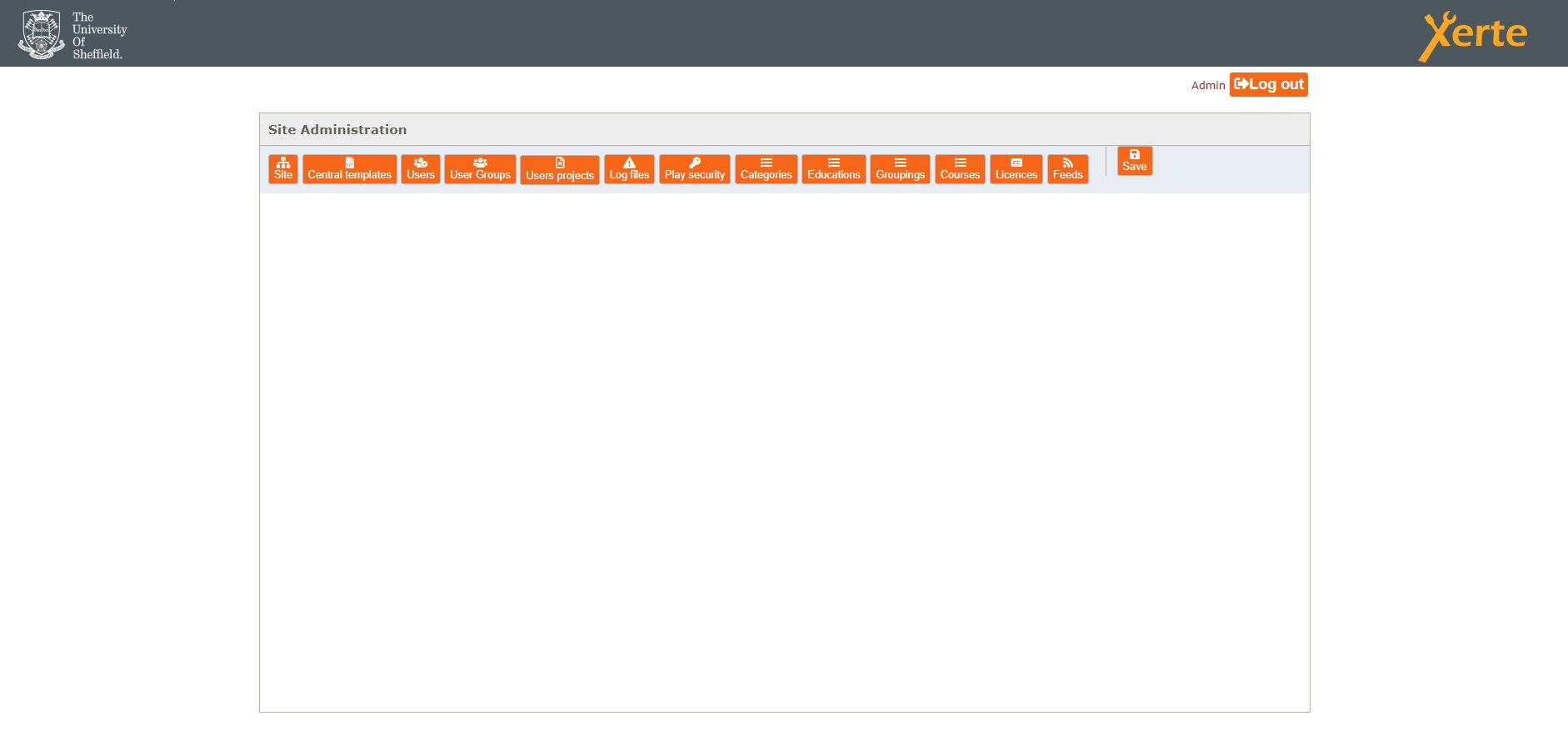
It turns out part of the problem was file permissions--some of the Xerte files were owned by a user that the webserver didn't have permission to read. I've corrected that and I'm now able to log into the management page, but it just shows the header and none of the actual settings. (See the attached screenshot.) The Nginx error log shows the following message when the page loads:
2024/03/05 09:59:36 [error] 343504#343504: *9 FastCGI sent in stderr: "PHP message: Failed to load language file for Xerte - en-GB/editor/js/vendor/jquery-1.9.1.min.js" while reading response header from upstream, client: 143.167.16.2, server: _, request: "POST /management.php HTTP/1.1", upstream: "fastcgi://unix:/run/php/php8.1-fpm.sock:", host: "xerted.shef.ac.uk", referrer: " xerted.shef.ac.uk/management.php "
I've checked, and editor/js/vendor/jquery-1.9.1.min.js *does* exist under the root path and *is* readable, so it looks like the problem is the prepended "en-GB". I'm sure I'm missing something obvious, but any idea where that's coming from?
Thanks for getting back to me. The server name has changed, but that (and the root file and import paths) are all correct in sitedetails.
It turns out part of the problem was file permissions--some of the Xerte files were owned by a user that the webserver didn't have permission to read. I've corrected that and I'm now able to log into the management page, but it just shows the header and none of the actual settings. (See the attached screenshot.) The Nginx error log shows the following message when the page loads:
2024/03/05 09:59:36 [error] 343504#343504: *9 FastCGI sent in stderr: "PHP message: Failed to load language file for Xerte - en-GB/editor/js/vendor/jquery-1.9.1.min.js" while reading response header from upstream, client: 143.167.16.2, server: _, request: "POST /management.php HTTP/1.1", upstream: "fastcgi://unix:/run/php/php8.1-fpm.sock:", host: "xerted.shef.ac.uk", referrer: " xerted.shef.ac.uk/management.php "
I've checked, and editor/js/vendor/jquery-1.9.1.min.js *does* exist under the root path and *is* readable, so it looks like the problem is the prepended "en-GB". I'm sure I'm missing something obvious, but any idea where that's coming from?
Please Log in or Create an account to join the conversation.
Time to create page: 0.165 seconds