

- Posts: 73
- Thank you received: 0
Report any technical problems you discover and discuss solutions.
Unable to edit existing LO
- 0kee
-
 Topic Author
- Offline
- Senior Member
-

Less
More
13 years 3 weeks ago #814
by 0kee
Unable to edit existing LO was created by 0kee
Hi,
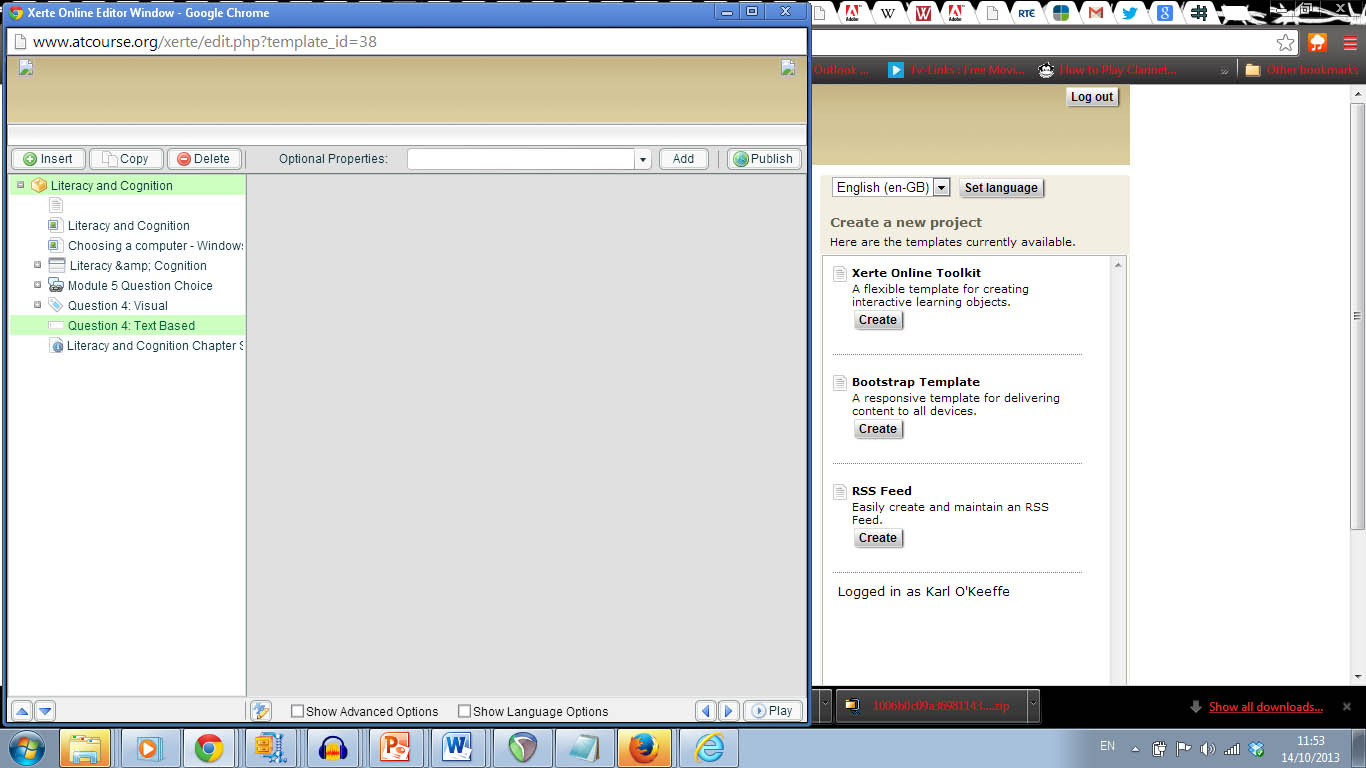
There are two of us working on a series on learning objects. My colleague reported having difficulty last Thursday. Certain pages wouldn't save. It was intermittent. Today I find that neither of us can edit the learning objects. They will open in the editor and you an see the pages in the list on the left. If you click on the pages however they do not appear in the window on the right to be edited (screen shot attached). Also if we duplicate a learning object, the new copy learning object contains no information. Everything has been working great up to this point. Can anyone advise me as to what the problem might be. We have made no changes to the install.
Many thanks,
Karl
There are two of us working on a series on learning objects. My colleague reported having difficulty last Thursday. Certain pages wouldn't save. It was intermittent. Today I find that neither of us can edit the learning objects. They will open in the editor and you an see the pages in the list on the left. If you click on the pages however they do not appear in the window on the right to be edited (screen shot attached). Also if we duplicate a learning object, the new copy learning object contains no information. Everything has been working great up to this point. Can anyone advise me as to what the problem might be. We have made no changes to the install.
Many thanks,
Karl
Please Log in or Create an account to join the conversation.
- tom
-

- Offline
- Administrator
-

Less
More
- Posts: 1365
- Thank you received: 344
13 years 3 weeks ago #816
by tom
Replied by tom on topic Unable to edit existing LO
Could you send us the USER-FILES/18-.../preview.xml file that is on the server?
To be able to do that, you have to have access to the server itself.
To be able to do that, you have to have access to the server itself.
Please Log in or Create an account to join the conversation.
- 0kee
-
Topic Author
- Offline
- Senior Member
-
Less
More
- Posts: 73
- Thank you received: 0
13 years 2 weeks ago #817
by 0kee
Replied by 0kee on topic Unable to edit existing LO
Hi Tom,
Thanks for getting back so quickly. I should have done this first but I tried using it in another browser (was using Chrome originally and then tried Firefox) and I can edit as normal in Firefox. I've attached the file you requested. We still have the intermittent problem of some pages not being saved. Maybe you can see something regarding that.
Thanks again.
Karl
Thanks for getting back so quickly. I should have done this first but I tried using it in another browser (was using Chrome originally and then tried Firefox) and I can edit as normal in Firefox. I've attached the file you requested. We still have the intermittent problem of some pages not being saved. Maybe you can see something regarding that.
Thanks again.
Karl
Please Log in or Create an account to join the conversation.
- 0kee
-
Topic Author
- Offline
- Senior Member
-
Less
More
- Posts: 73
- Thank you received: 0
13 years 2 weeks ago #818
by 0kee
Replied by 0kee on topic Unable to edit existing LO
OK I'm not sure if this is it but I think the problem might be down to Page Links. We were trying to use page links on some pages. Any time we used them the LO would not publish or save any changes. When we removed the page links it saved and updated as normal.
So page links only work on certain page types?
Or do they only work when publishing in Flash (we are publishing as HTML)?
Thanks,
Karl
So page links only work on certain page types?
Or do they only work when publishing in Flash (we are publishing as HTML)?
Thanks,
Karl
Please Log in or Create an account to join the conversation.
- JohnSmith
-

- Offline
- Moderator
-

Less
More
- Posts: 397
- Thank you received: 71
13 years 2 weeks ago - 13 years 2 weeks ago #834
by JohnSmith
Replied by JohnSmith on topic Unable to edit existing LO
Hi Karl,
The page links should work in any of the page types that will link a glossary term. What version of the code are you using - you can find out at /version.txt
Also, what page type are you having problems with? Can you add the page link and try to save and if you have problems saving, take a screenshot showing the code that xot has added to the field. Also, is the same thing happening in all browsers or just in some? What browsers have you tried?
Tom, I see that you have now added pdf, doc and docx attachments, should we also include xml so that people can attach their data/preview files if required - or is xml already included?
John
The page links should work in any of the page types that will link a glossary term. What version of the code are you using - you can find out at /version.txt
Also, what page type are you having problems with? Can you add the page link and try to save and if you have problems saving, take a screenshot showing the code that xot has added to the field. Also, is the same thing happening in all browsers or just in some? What browsers have you tried?
Tom, I see that you have now added pdf, doc and docx attachments, should we also include xml so that people can attach their data/preview files if required - or is xml already included?
John
Last edit: 13 years 2 weeks ago by JohnSmith. Reason: I cant spell...
Please Log in or Create an account to join the conversation.
- tom
-
- Offline
- Administrator
-
Less
More
- Posts: 1365
- Thank you received: 344
13 years 2 weeks ago #835
by tom
Replied by tom on topic Unable to edit existing LO
XML is now added as well.
Please Log in or Create an account to join the conversation.
Moderators: ronm, julten, JohnSmith
Time to create page: 0.361 seconds