

- Posts: 1365
- Thank you received: 344
Questions on getting Xerte Toolkits installed on your server and questions about authentication and user logins.
Object not found!
- tom
-

- Offline
- Administrator
-

Less
More
10 years 1 month ago #3998
by tom
Replied by tom on topic Object not found!
I looked in the documentation of MAMP, and they install MySQL with a default password (XAMPP does not)
So, try as host just localhost, but enter
as the password.
So, try as host just localhost, but enter
Code:
root
Please Log in or Create an account to join the conversation.
- claire.saunders@solent.ac.uk
-

- Offline
- Junior Member
-

Less
More
- Posts: 25
- Thank you received: 0
10 years 1 month ago #3999
by claire.saunders@solent.ac.uk
Replied by claire.saunders@solent.ac.uk on topic Object not found!
Hi,
I am afraid this returns the message:
SQLSTATE[HY000] [2002] Connection refused
I am afraid this returns the message:
SQLSTATE[HY000] [2002] Connection refused
Please Log in or Create an account to join the conversation.
- tom
-
- Offline
- Administrator
-
Less
More
- Posts: 1365
- Thank you received: 344
10 years 1 month ago - 10 years 1 month ago #4000
by tom
Replied by tom on topic Object not found!
Hmm.. Even though in the MAMP panel the MySQL port was still showing 3306, it was actually running on the default MAMP port 8889
So I had to stop the servers in the MAMP panel and then start them again. Then it worked with the following settings:
Database host: localhost
Database username: root
Database password: root
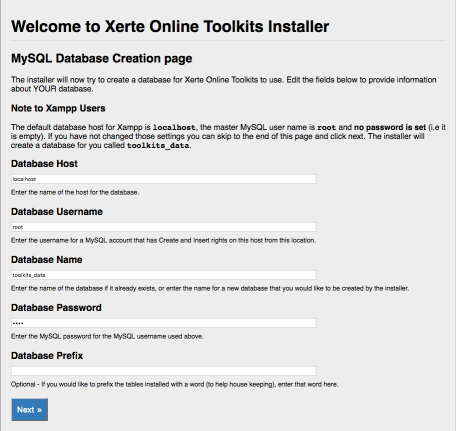
So I had to stop the servers in the MAMP panel and then start them again. Then it worked with the following settings:
Database host: localhost
Database username: root
Database password: root
Last edit: 10 years 1 month ago by tom.
The following user(s) said Thank You: claire.saunders@solent.ac.uk
Please Log in or Create an account to join the conversation.
- claire.saunders@solent.ac.uk
-
- Offline
- Junior Member
-
Less
More
- Posts: 25
- Thank you received: 0
10 years 1 month ago #4005
by claire.saunders@solent.ac.uk
Replied by claire.saunders@solent.ac.uk on topic Object not found!
And I'm in!!
Thank you all for your patience and perseverance.
Claire
Thank you all for your patience and perseverance.
Claire
Please Log in or Create an account to join the conversation.
- tom
-
- Offline
- Administrator
-
Less
More
- Posts: 1365
- Thank you received: 344
10 years 1 month ago #4007
by tom
Replied by tom on topic Object not found!
You're welcome.
Please Log in or Create an account to join the conversation.
Time to create page: 0.147 seconds